

Priority Dispatch ProQA transfer protocols, inside Epic
The Medical Transfer Protocol app by Priority Dispatch, powered by VectorCare, is a SMART on FHIR app that runs ProQA Protocols 45, 46 and 47 inside Epic. Your health system runs its own 911 and transfer fleet. Your communication center already uses ProQA. Now Protocols 45, 46 and 47 run inside the EHR too, at the point where staff schedule the transport. The app opens from the patient chart.
Priority Dispatch makes ProQA.
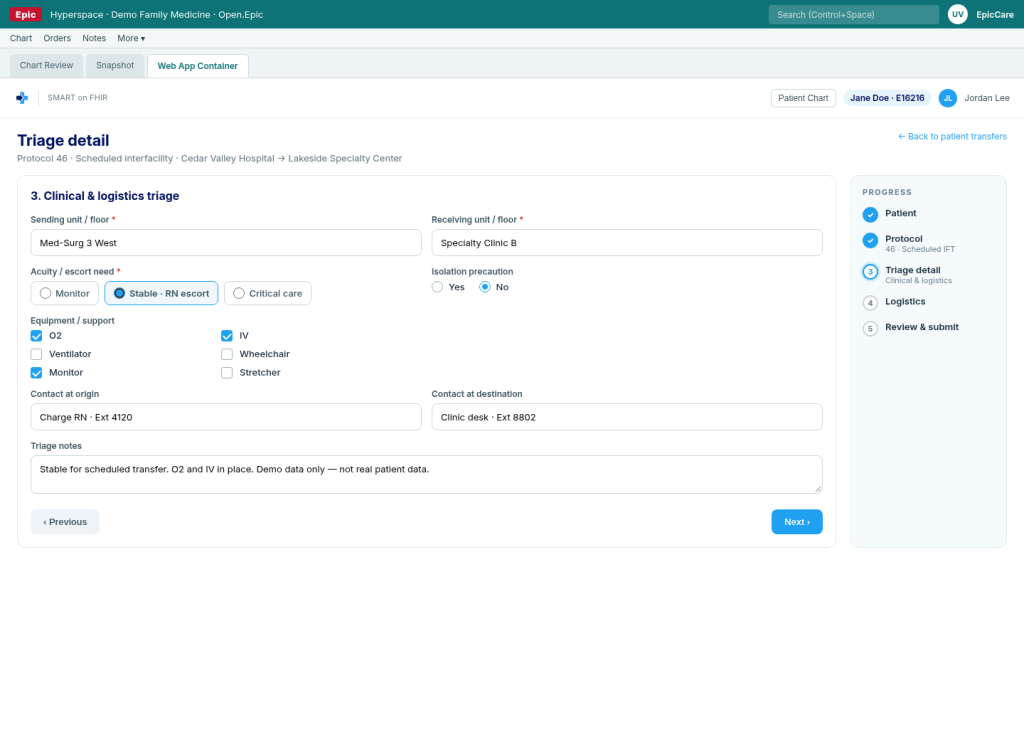
Illustrative example · schedule from the chart · not real patient data
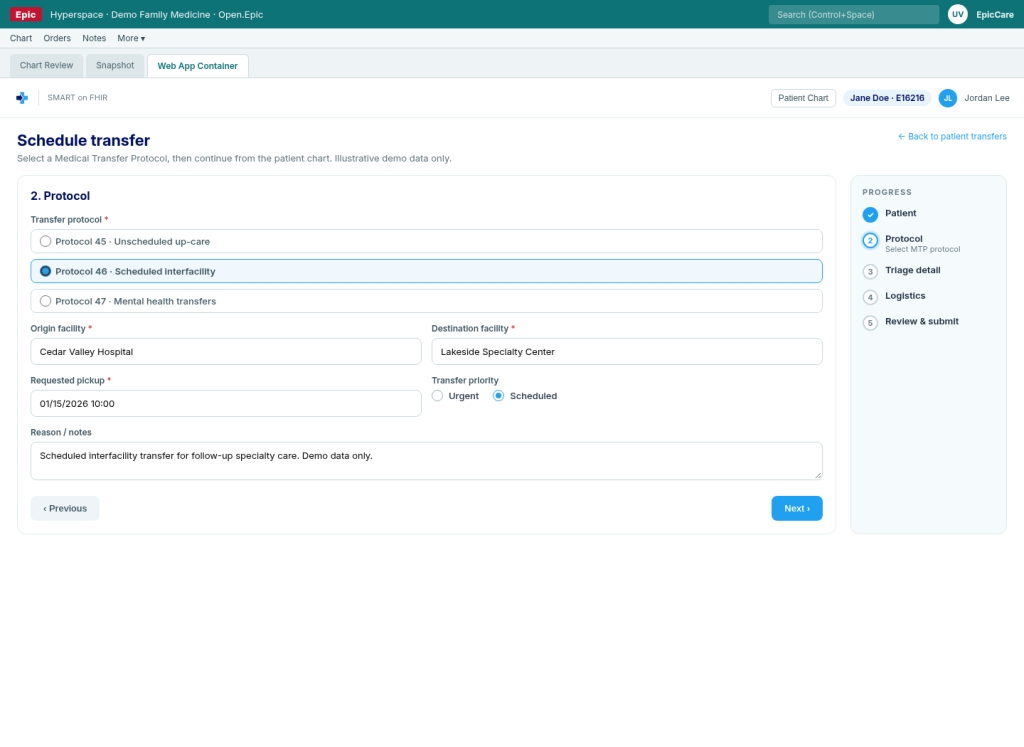
Three modules inside your EHR
Protocol 45: Specialized Unscheduled Up-Care Transports
What it covers. Priority Dispatch defines Protocol 45 for a patient who moves to a higher, more acute level of care.
What staff see in the EHR. Staff start the transfer from the chart of the patient who needs a higher level of care. The app asks the Protocol 45 questions that your agency turned on. The answers go with the request into transport scheduling.
Protocol 46: Scheduled Interfacility Transfers (Routine)
What it covers. Priority Dispatch defines Protocol 46 for a patient who moves to another facility with a similar level of care, on a routine schedule.
What staff see in the EHR. Staff book the scheduled transfer from the chart. The app asks the Protocol 46 questions, for example about medication, equipment and bariatric needs. The request goes into the schedule with that detail attached.
Protocol 47: Mental Health Transfers
What it covers. Priority Dispatch defines Protocol 47 for a patient with a diagnosis or symptoms of mental illness who moves to a medical or support facility.
What staff see in the EHR. Staff start the mental health transfer from the chart. The app asks the Protocol 47 questions that your agency turned on. The answers go with the request, so the crew has the information before pickup.
Applies to all three: Your agency can turn each question on or off for each protocol, and can set the equipment and medication lists.
Order from three channels
EHR
Through SMART on FHIR, from the patient chart in Epic, with Protocols 45, 46 and 47.
Web app
The VectorCare web app, with Protocols 45, 46 and 47.
Mobile app
The VectorCare mobile app, with Protocols 45, 46 and 47.
How it works
Your Epic team adds the Medical Transfer Protocol app and sets launch points and roles.
Staff open the app from the patient or encounter.
Staff choose Protocol 45, 46 or 47 and answer the questions.
The request, with the protocol answers, goes into transport scheduling for your fleet.
Priority Dispatch owns the protocols. VectorCare provides the rails and does not dispatch vehicles.
Proof
At one VectorCare client, the average time to schedule a ride went from 31 minutes to 3 minutes.
Frequently asked questions
They are the three protocols of the Medical Transfer Protocol Suite from Priority Dispatch. Protocol 45 covers specialized unscheduled up-care transports. Protocol 46 covers routine scheduled interfacility transfers. Protocol 47 covers mental health transfers.
Health systems that run their own ambulance fleet and their own communication center, and that use ProQA or plan to.
Inside the EHR, in a SMART on FHIR app that opens from the patient chart, at the point where staff schedule the transport.
Yes. Priority Dispatch states that agencies can turn questions on or off for each protocol and can customize equipment and medication lists.
No. VectorCare provides the rails: the SMART on FHIR connection and the scheduling network. Priority Dispatch provides the protocols. Your fleet does the transport.
ProQA, MPDS and Medical Transfer Protocol Suite are trademarks of Priority Dispatch Corp. Epic is a trademark of Epic Systems Corporation. SMART on FHIR is a trademark of its owners.