Introduction
Picture this: a patient is medically cleared for discharge at 10 AM. The transport request goes out by phone. The first vendor doesn't pick up. The second is unavailable. By the time a ride is confirmed, it's 2 PM — and the patient is still occupying a bed that another patient needs.
That four-hour gap carries real costs: the hospital loses bed capacity, the waiting patient's care is delayed, and the care coordinator has spent half a shift on hold.
This scenario plays out daily across healthcare systems that still rely on manual scheduling processes. Care coordinators spend hours on the phone chasing provider availability, managing transport requests across disconnected systems, and following up on confirmations that never came through.
Automated scheduling addresses these breakdowns at every stage — from appointment intake through post-discharge transport. What follows covers the core benefits and best practices, with a focus on where intelligent automation has the greatest operational impact.
Key Takeaways
- Automated scheduling cuts manual coordination tasks, reduces administrative errors, and lowers no-show rates
- EHR integration, intelligent workflow design, and automated reminders are the practices that move the needle most on scheduling efficiency
- AI-powered platforms extend well beyond booking to automate dispatching, vendor management, and real-time logistics coordination
- Measuring success requires tracking KPIs like fill rates, delay reduction, time-to-schedule, and on-time performance
What Is Automated Patient Scheduling?
Automated patient scheduling uses technology to manage appointment booking, resource allocation, and care coordination workflows — replacing manual, phone-based processes with rule-driven systems that operate in real time.
There are two distinct types relevant to healthcare:
| Type | What It Covers | Complexity |
|---|---|---|
| Outpatient appointment scheduling | Booking patients for clinical visits | Moderate — one-to-one matching |
| Patient logistics scheduling | Transport, transfers, home health, DME, post-acute care | High — multi-party, multi-vendor coordination |
VectorCare operates at the logistics layer, where automation must account for vendor availability, transport acuity, live location-based constraints, and bidirectional communication with EHR systems. That coordination complexity is an order of magnitude greater than a standard clinical appointment booking.
In both contexts, the underlying goal is to remove the administrative friction that delays care — getting the right resource to the right patient without a phone call to make it happen.
Why Manual Scheduling Falls Short in Healthcare
Manual scheduling creates measurable clinical and financial harm — not just operational friction.
The Operational Burden
Care coordinators managing transport, referrals, and discharge logistics can spend the majority of their day on tasks that contribute nothing clinical: phone calls to confirm vendor availability, faxes that never arrive, and manual record updates across disconnected systems. Every minute spent on those tasks is time not spent on patient care.
Where Manual Processes Break Down
The failure points are predictable and recurring:
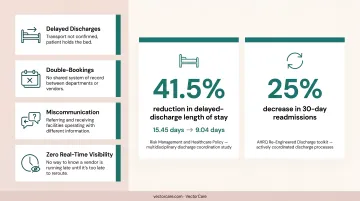
- Delayed discharges — transport not confirmed, patient holds the bed
- Double-bookings — no shared system of record between departments or vendors
- Miscommunication — referring and receiving facilities operating with different information
- Zero real-time visibility — no way to know a vendor is running late until it's too late to reroute
These aren't just operational annoyances. A multidisciplinary discharge coordination study published in Risk Management and Healthcare Policy found that structured coordination reduced delayed-discharge length of stay from 15.45 days to 9.04 days — a 41.5% reduction. The AHRQ's Re-Engineered Discharge toolkit separately documents a 25% decrease in 30-day readmissions when discharge processes are actively coordinated.
The Scale Problem
Those failure points compound quickly as volume grows. A single coordinator managing 10 daily transports can keep pace with phone-based workflows. That same coordinator managing 30 transports across multiple facilities cannot — not without dropping requests, missing callbacks, or causing delays. At that volume, automation becomes the only workable model.
Key Benefits of Automated Patient Scheduling
Reduced Administrative Burden
Automating routine scheduling tasks — intake, confirmation, dispatching, follow-up — directly frees staff from coordination overhead. VectorCare's platform, for example, demonstrates that scheduling takes less than 3 minutes vs. ~31 minutes by phone (90% reduction), through its EHR-embedded SMART on FHIR application within Epic. For a 250-bed hospital with 25 daily transports, that translates to thousands of hours recovered annually.
Fewer No-Shows and Delays
No-show rates average around 23% across healthcare settings, according to a 2018 systematic review — with some settings exceeding 40%. Automated reminder systems directly reduce that gap.
A 2016 meta-analysis of 28 studies found a pooled odds ratio of 1.62 for improved appointment attendance with SMS reminders. A 2018 randomized trial further found that two automated reminders produced a 4.4% no-show rate versus 5.3–5.8% with a single reminder — a meaningful difference at volume.
Faster, More Accurate Resource Matching
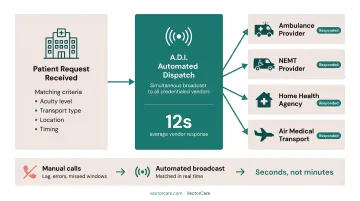
Manual vendor calls introduce lag, errors, and missed windows. Automated dispatching matches patient needs — acuity, transport type, location, timing — to available providers in real time. VectorCare's platform simultaneously broadcasts transport requests to multiple credentialed vendors, with providers responding in seconds rather than minutes.
Cost Savings and Revenue Protection
Scheduling delays cost money in ways that compound: extended bed occupancy, overtime for staff managing manual coordination, and penalties from delayed discharges. Documented results from VectorCare deployments include:
- $22.2 million in annual scheduling time savings at a large California payer
Improved Patient Outcomes
A 2025 review published in PMC found that centralized discharge oversight can reduce length of stay by 0.5 to 1 day, with intelligent dispatch improvements of 78% in dispatch time and 32% in pickup time. Faster discharge coordination means shorter stays; better transport matching means fewer missed transfers.
Post-discharge logistics matter just as much. Patients sent home without confirmed transport or follow-up care return to the ED at disproportionately high rates — making reliable scheduling a readmission prevention tool, not just an operational convenience.
Best Practices for Implementing Automated Patient Scheduling
Getting automation right means more than selecting the right platform. How you configure, integrate, and roll it out determines whether staff adopt it — and whether patients actually benefit.
Design Workflows Around Patient Needs, Not Just Provider Availability
Effective scheduling automation starts with mapping the patient journey end-to-end — from intake request to confirmed service delivery. Automation rules should account for patient acuity, service type, timing requirements, and preferred vendors, not just open slot availability.
A transport workflow designed for a dialysis patient with standing weekly appointments looks completely different from one handling an urgent interfacility transfer. Both need automation, but the rules governing each must reflect those differences.
Integrate With Your EHR From Day One
Scheduling systems that don't connect to the EHR immediately recreate the problem they're supposed to solve. Coordinators still have to manually verify patient information, enter data twice, and reconcile discrepancies.
Standards like SMART on FHIR enable bidirectional data exchange between scheduling platforms and EHRs like Epic. VectorCare's SoFaaS (SMART on FHIR as a Service) infrastructure, for example, automatically pulls patient demographics, insurance information, and discharge details when a care coordinator launches the application within Epic — eliminating manual data entry at the point of scheduling.
This kind of integration is no longer niche. The ONC reported that more than two-thirds of non-federal acute care hospitals used HL7 FHIR APIs for patient data access as of 2022, making standards-based integration increasingly achievable.
Automate Reminders Across Multiple Channels
One reminder outperforms none. Two outperform one — randomized trial data on appointment adherence consistently supports a multi-touchpoint sequence:
- Booking confirmation: Send immediately at time of scheduling
- 48-hour reminder: Deliver via the patient's preferred channel (SMS, email, or voice)
- Day-of notification: Keep it short and actionable, with an easy reschedule option
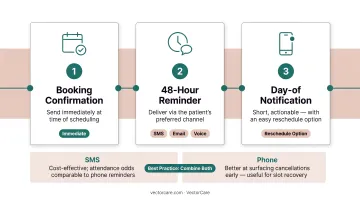
Research supports SMS as a cost-effective channel, with attendance odds comparable to phone reminders. Phone calls, however, are better at surfacing cancellations early — useful for slot recovery logic. The right approach typically combines both.
Build in Intelligent Waitlist and Cancellation Management
Cancelled slots represent lost revenue and wasted capacity. Automated waitlist management triggers immediate notifications to next-eligible patients or alternate vendors when a cancellation occurs — preventing the slot from going unfilled.
In patient logistics, the stakes are higher. When a transport vendor cancels, the rerouting window is narrow. Platforms with real-time multi-vendor network access can rebroadcast a request immediately across the available vendor pool, rather than waiting for a coordinator to work through manual calls.
Train Staff and Track Adoption Continuously
Automation tools only deliver value when staff use them correctly. Under-adoption is one of the most common implementation failures — not because the platform doesn't work, but because the rollout didn't address change management.
Steps that improve adoption:
- Designate internal workflow champions in each department
- Run structured onboarding before go-live, not just after
- Review usage analytics quarterly to catch process gaps early
- Gather staff feedback at 30, 60, and 90 days post-launch
The Role of AI and EHR Integration in Smarter Scheduling
Rule-based automation handles the predictable. AI handles the variable.
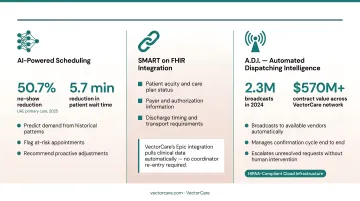
AI-powered scheduling systems use historical data and pattern recognition to predict demand, flag at-risk appointments, and recommend proactive adjustments. A 2025 before-after study in UAE primary care reported a 50.7% no-show reduction and a 5.7-minute reduction in patient wait time after implementing a real-time analytics and AI no-show management program. Those numbers reflect what happens when AI acts on patterns no coordinator can track manually.
EHR integration takes this further. When a scheduling system connects directly to the EHR via SMART on FHIR, it automatically extracts clinical context to inform smarter matching decisions:
- Patient acuity and care plan status
- Payer and authorization information
- Discharge timing and transport requirements
VectorCare's Epic integration is a practical example: rather than requiring a coordinator to re-enter data already in the EHR, the platform pulls it automatically and populates the transport or logistics request in real time.
The next evolution is Automated Dispatching Intelligence (A.D.I.): AI agents that go beyond scheduling to actively manage the full logistics workflow. A.D.I. broadcasts requests to available vendors, manages the confirmation cycle, and escalates unresolved requests without human intervention at each step. In 2024, this approach generated 2.3 million broadcasts with contract value exceeding $570 million across VectorCare's network.
All of this runs on HIPAA-compliant, cloud-based infrastructure — a non-negotiable requirement for any platform handling protected health information at this scale and speed.
How to Measure Scheduling Automation Success
Implementation starts the process — but ongoing measurement is what determines whether it's actually delivering results.
Core KPIs to Track
| KPI | What It Measures | Baseline Reference |
|---|---|---|
| No-show/cancellation rate | Appointment adherence | ~23% industry average (2018 systematic review) |
| Time-to-schedule | Request to confirmed booking | Track against pre-automation baseline |
| Administrative hours saved | Coordination time reduction | Document current hours before launch |
| On-time performance rate | Transport/service delivery timeliness | Track by vendor segment |
| Slot fill rate | Capacity utilization | Monitor weekly for trend |
For access wait times, the third next available appointment is the preferred benchmark — the first and second available slots may reflect cancellations rather than true access capacity.
Use Analytics to Find Patterns, Not Just Report Numbers
Dashboards that only display totals miss the actionable insights. Look for patterns:
- Which time slots or days consistently generate delays?
- Which vendors underperform on on-time metrics?
- Where in the workflow do requests stall?
VectorCare's platform, for example, captures timestamps throughout each request — pickup confirmation, en route status, arrival — making it possible to identify exactly where delays originate, rather than just observing that they occurred.
Review Quarterly, Adjust Continuously
Scheduling rules that worked at launch may not reflect today's patient population or service mix. A structured review cadence keeps automation aligned with reality:
- Monthly: Monitor core KPIs against baseline
- Quarterly: Compare against pre-automation metrics, assess remaining bottlenecks, gather staff feedback
- Annually: Evaluate whether automation rules reflect current patient population and service mix
Teams that build this review rhythm into operations — rather than treating it as a periodic audit — consistently close performance gaps faster and with less disruption.
Frequently Asked Questions
What is automated patient scheduling in healthcare?
Automated patient scheduling uses technology to manage appointment booking, resource coordination, and logistics workflows without manual intervention. Unlike traditional phone-based scheduling, it uses rule-driven systems and real-time data to match patients with the right resources automatically.
How does automated scheduling reduce no-show rates?
Automated reminders sent via SMS, email, or phone at booking confirmation, 48 hours out, and day-of keep patients informed and give them an easy way to confirm or reschedule. Research across 28 studies found a pooled odds ratio of 1.62 for improved attendance with SMS reminders alone.
What is the difference between patient appointment scheduling and patient logistics scheduling?
Patient appointment scheduling focuses on booking clinical visits. Patient logistics scheduling coordinates the full continuum of care: transport, transfers, home health, and DME. It requires multi-party, multi-vendor automation that is considerably more complex than single-appointment booking.
How does EHR integration improve automated patient scheduling?
EHR integration allows the scheduling system to automatically pull accurate patient data, verify insurance, and update records in real time — eliminating duplicate data entry and reducing errors. Standards like SMART on FHIR enable this bidirectional exchange with systems like Epic.
What are the biggest challenges when implementing automated patient scheduling?
The top challenges are system integration complexity, staff adoption, and workflow design. A platform with strong EHR connectivity, structured onboarding support, and ongoing usage monitoring handles all of these without custom development work.
How do I measure the ROI of automated patient scheduling?
Track hours saved on manual coordination, reduction in no-shows and delays, on-time performance improvement, and direct cost savings from reduced overtime and transport optimization. Capture baseline data before go-live; without it, you have no reliable benchmark to measure gains against.