Introduction
Healthcare administrators face a stubborn structural problem: fragmented systems that force clinical staff to manually bridge technologies that won't communicate. The result is phone tag, duplicate data entry, and coordination tasks that pull nurses and care coordinators away from patients.
The scale of this burden is significant. A 36-hospital time-motion study found that medical-surgical nurses spent 20.6% of their practice time on care coordination and another 35.3% on documentation — meaning more than half their working hours went to tasks other than direct patient care.
That's not a process failure. The underlying infrastructure — disconnected systems with no shared data layer — is what drives the waste.
This article covers what clinical workflow integration actually means, which workflow types matter most, the features that separate effective platforms from expensive ones, proven implementation practices, and the measurable benefits healthcare organizations can expect when they get it right.
Key Takeaways:
- Clinical workflow integration connects systems so staff act on the right information without switching tools or re-entering data
- Transport, DME, and home health logistics are a distinct integration layer that most platforms neglect
- EHR interoperability, automation, and real-time visibility are non-negotiable features
- Map workflows before automating them; staff involvement determines adoption
- Measurable benefits include reduced administrative burden, shorter length of stay, and improved on-time transport performance
What Is Clinical Workflow Integration in Healthcare?
Defining the Terms
A clinical workflow is a repeatable series of coordinated tasks performed by healthcare professionals across roles, departments, and settings to deliver patient care. AHRQ defines workflow as "the sequence of physical and mental tasks performed by various people within and between work environments" — a definition that deliberately spans people, locations, and time.
Workflow integration is the embedding of data, tools, automation, and communication systems directly into these existing processes so staff can act without switching systems or duplicating effort. HIMSS defines interoperability as the ability of systems, devices, and applications to access, exchange, integrate, and cooperatively use data in a coordinated manner — within and across organizational boundaries.
Why It's No Longer Optional
Legacy technologies create data silos that slow clinical decision-making and increase care delay risk at exactly the points where continuity matters most: handoffs between facilities and care settings.
The financial consequences are documented. JAMA research links care coordination failure to:
- $27.2B–$78.2B in annual waste from coordination breakdowns alone
- $265.6B in additional waste from administrative complexity
- 20% of transferred patients receiving duplicate tests due to missing EHR interoperability — tests that shared data would eliminate
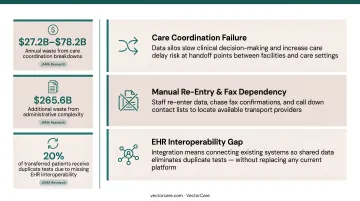
Integration doesn't require replacing existing systems. It means connecting them so staff stop re-entering data, chasing fax confirmations, or calling down a contact list to find an available transport provider.
Types of Clinical Workflows Healthcare Organizations Must Manage
Healthcare operations involve three distinct workflow categories, each requiring its own integration strategy.
Inter-Organizational Workflows
These span multiple facilities or providers — hospital-to-SNF transfers, referrals, interfacility transport, payer authorizations. They're typically the most fragmented because no single organization owns the full process.
The stakes are high: 1 in 4 Medicare patients with acute medical illness discharges to a skilled nursing facility, and 23% of those patients are readmitted within 30 days. Poor handoff workflows are a primary driver. When treatment plans, medication lists, and transport details aren't transmitted in a structured, timely way, gaps emerge that harm patients and inflate costs.
Intra-Clinical Workflows
These are the daily processes within a single facility. Common examples include:
- Scheduling and physician order entry
- Discharge planning and care coordination
- Internal communication between nursing and administration
They consume significant staff time when poorly designed — especially when documentation systems don't connect to coordination tools.
Patient Logistics Workflows
This category is distinct and frequently underestimated. Patient logistics covers the coordination of transport, care transitions, and post-discharge services — NEMT, ambulance, home health visits, DME delivery — that function as the operational infrastructure connecting clinical decisions to actual care delivery.
Consider the volume: MACPAC reported 3.2 million Medicaid beneficiaries used NEMT in FY2018, totaling over 60 million ride-days and $2.6 billion in state and federal spending. That volume requires its own integration strategy — not a phone tree.
VectorCare is built specifically for this layer, treating transport, DME, and home health coordination as infrastructure rather than a back-office function. Without it integrated, clinical decisions — discharge, transfer, referral — are made without visibility into whether the logistics needed to execute them are actually in place.
Must-Have Features for Effective Clinical Workflow Integration
EHR Integration and Interoperability
Any workflow tool that doesn't connect to the organization's primary EHR will create more fragmentation, not less. Integration must use industry-standard protocols (specifically FHIR) to enable real-time, bidirectional data exchange.
The adoption curve supports urgency: 70% of U.S. hospitals now use standards-based APIs for patient access, and 52% integrate clinical data through standards-based APIs. Solutions embedded natively within the EHR eliminate duplicate data entry and keep clinicians in a single interface.
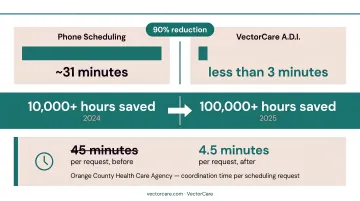
VectorCare's SMART on FHIR Epic integration illustrates this in practice. When a coordinator initiates a transfer from within Epic, patient data (vitals, weight, clinical context) is already populated in the logistics request. Scheduling takes less than 3 minutes vs ~31 minutes by phone (90% reduction), with no system switching required.
Automation of Repetitive Coordination Tasks
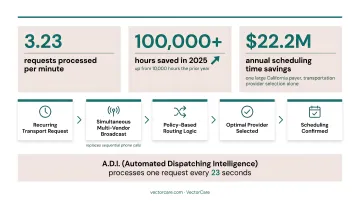
High-volume, rules-based tasks such as dispatching, vendor notification, and scheduling recurring transport are prime candidates for automation. VectorCare's A.D.I. (Automated Dispatching Intelligence) demonstrates what automation looks like at scale: simultaneous multi-vendor broadcasts replace sequential phone calls, with routing logic selecting the optimal provider based on configured policies. The platform processes 3.23 requests per minute. In 2025, A.D.I. saved healthcare systems and suppliers more than 100,000 hours — up from 10,000 hours the prior year. One large California payer achieved **$22.2 million in annual scheduling time savings**.
Real-Time Visibility and Tracking
Integrated workflows must give all stakeholders (hospital, transport provider, receiving facility) live status updates on patient location and care transition milestones. AHRQ identifies transitions of care as "vulnerable periods associated with patient-safety risks, including adverse events, medication errors, and communication failures."
When visibility is missing, care teams operate on lag — each party waiting for the previous one to act. Real-time tracking lets a receiving facility prepare for a patient before the ambulance has left the originating site.
Configurable, No-Code Workflow Design
Healthcare operations teams need the ability to configure workflows, triggers, and notifications without waiting on IT development cycles. Care protocols change, patient populations vary, and rigid systems that require developer involvement to adjust become liabilities.
Platforms with no-code workflow builders allow operations staff to define rules at the facility level, role level, or care line level — enabling standardization without forcing every facility into the same rigid process.
Key configuration capabilities to look for include:
- Facility-level and role-level rule definitions
- Trigger-based notifications for care transition milestones
- Adjustable routing logic without developer dependencies
- Care line-specific workflow templates
Compliance, Security, and Audit Trails
Integrated platforms handling patient data across multiple facilities and providers are business associates under HIPAA. HHS is clear: any cloud service provider that creates, receives, maintains, or transmits ePHI must execute a BAA and maintain technical safeguards per 45 CFR 164.312, covering access controls, audit logs, and transmission security.
VectorCare's platform is built on HIPAA-secure cloud infrastructure with automated timestamps and configurable reporting. Its Trust module handles credential management across the provider network, verifying every supplier is credentialed before accessing patient data or executing orders.
Clinical Workflow Integration Best Practices
Map Workflows Before You Automate Them
The most common implementation mistake is automating broken workflows. Automation doesn't fix a flawed process — it executes it faster.
Before selecting or configuring any integration tool:
- Document the current-state workflow in detail — every handoff, every data entry point, every communication touchpoint
- Identify failure points — where handoffs break, where data is re-entered, where decisions are delayed by missing information
- Engage frontline staff — nurses, care coordinators, and dispatch teams know where inefficiencies actually occur, not where leadership assumes they do
- Prioritize by impact — focus initial mapping on workflows with the highest volume or the most severe consequences when they fail
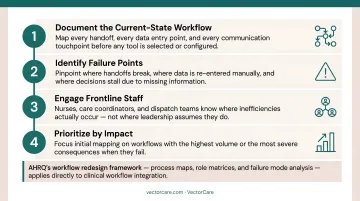
AHRQ's workflow redesign project created formal tools — including process maps, role matrices, and failure mode analysis — to guide health IT implementation. That same assessment framework applies directly to clinical workflow integration.
Prioritize Interoperability and Staged Implementation
Don't attempt a full-system overhaul simultaneously. A phased approach reduces go-live risk and lets organizations validate configurations before expanding scope.
Recommended sequence:
- Phase 1: Integrate with the primary EHR first, using FHIR-compliant connections
- Phase 2: Layer in adjacent systems — patient logistics platforms, transport networks, DME providers
- Phase 3: Expand automation rules and reporting as baseline data accumulates
Platforms with pre-built connections to major EHR systems and established provider networks reduce both implementation time and disruption risk. For VectorCare customers, SMART on FHIR-based Epic integration compresses timelines from months to weeks — because the standardized API endpoints already exist and authorized applications connect without custom interface development.
Measure Performance and Build a Culture of Iteration
Integration is not a one-time project. Without measurement, there's no way to demonstrate ROI or identify what still needs improvement.
Track these metrics post-implementation:
- Time-to-dispatch for transport requests
- On-time transport performance
- Communication-related delay rates
- Patient length of stay
- Staff time spent on coordination tasks per discharge or transfer
Establish regular cross-functional workflow reviews — clinical, operations, and IT — to refine configurations, handle edge cases, and ensure the integrated system evolves with the organization's care model.
A benchmarking survey of 25 U.S. health systems found that 100% of capacity command centers tracking ROI reported positive returns. Organizations that measure consistently don't just prove value — they know where to improve next.
The Benefits of Integrated Clinical Workflows
Reduced Administrative Burden
Automation directly frees clinical and operations staff. Scheduling takes less than 3 minutes vs ~31 minutes by phone (90% reduction) — and the time recovered at scale is substantial. VectorCare's A.D.I. has demonstrated this trajectory — from 10,000 hours saved in 2024 to 100,000+ hours in 2025 as adoption expanded.
For individual staff, the change is tangible. VectorCare's platform has driven significant scheduling time savings across partner organizations, including reducing coordination time from 45 minutes to 4.5 minutes per request for Orange County Health Care Agency.
Shorter Patient Length of Stay and Fewer Readmissions
Logistics bottlenecks extend hospital stays. When discharge coordination — transport scheduling, DME ordering, home health referrals — runs on phone calls and fax machines, delays accumulate.
A hospital managing 30–50 discharges per day, each requiring coordination across multiple vendors, can see thousands of staff hours consumed monthly by logistics tasks alone.
Faster, more integrated care transitions reduce these delays directly. Cochrane review evidence supports structured discharge planning as a routine intervention intended to reduce delayed discharge and unplanned readmission.
Improved On-Time Performance
Real-time visibility and automated notifications enable all parties to act simultaneously rather than sequentially. A 2024 hospital patient-transport study found that a real-time data-driven dispatch system reduced overtime transport delays from 41.0% to 26.5% — a measurable operational improvement tied directly to integration.
Reduced Clinician and Staff Burnout
The AMA reported 41.9% of physicians experienced at least one burnout symptom in 2025 — and administrative burden is a primary driver. When care teams spend less time on logistics and more time on clinical decision-making, the effect on job satisfaction is direct.
Fewer phone calls, status checks, and manual data entries in a coordinator's day adds up to something more meaningful than efficiency gains: it shifts the work back toward patient care.
The four benefits reinforce each other. Less administrative time means faster discharges. Faster discharges reduce length of stay. Better on-time performance reduces care gaps. And lighter coordination loads reduce the burnout that drives staff turnover.
Common Challenges in Clinical Workflow Integration
Three challenges consistently derail integration projects — even when the technology itself is sound.
Legacy System Incompatibility Many organizations rely on older systems that lack modern API connectivity. The practical bridging strategy is FHIR-compliant middleware that connects legacy infrastructure to standards-based platforms without requiring a full system replacement. Large EHR transitions can cost $250M to over $1B. Phased modernization with a standards-based integration layer is typically the more practical path.
Staff Resistance and Change Management Well-designed integrations fail when staff don't adopt them. A 2023 integrative review found nursing resistance to change is multifactorial — individual, interpersonal, and organizational. Three practices that consistently improve adoption:
- Communicate the why before the how
- Provide adequate training tied to specific workflow changes, not just platform features
- Identify internal champions who model new workflows for peers
Balancing Standardization with Flexibility Standardized workflows improve consistency and reduce errors. But different departments, facilities, and care settings have legitimate workflow variations. The answer is configurable platforms that enforce standardized rules while allowing role-based or location-based customization.
Rigidity that ignores local reality gets worked around. Flexibility without structure produces inconsistency.
Frequently Asked Questions
What is workflow integration?
Workflow integration is the process of connecting systems, tools, and data sources so they operate together within existing processes. In healthcare, this means embedding EHRs, logistics platforms, and communication tools into clinical and operations routines so information flows automatically — without manual switching or re-entry.
What is a clinical workflow?
A clinical workflow is a repeatable series of coordinated tasks performed by healthcare professionals — across roles, departments, or facilities — to deliver a specific element of patient care, such as admission, transfer, medication management, or discharge coordination.
What are examples of clinical workflows?
Common examples span the full care continuum:
- Patient admission and triage
- Physician order entry and medication dispensing
- Discharge planning and patient transport coordination
- Referral management between facilities
- Post-acute setup including home health and DME
What are the 5 steps of a workflow?
The general five steps are:
- Initiation or trigger
- Task assignment
- Execution
- Review or approval
- Completion and documentation
In healthcare, each step requires accurate data, clear accountability, and compliant record-keeping.
What are the benefits of clinical workflow integration?
Key benefits include:
- Reduced administrative burden on clinical staff
- Fewer care coordination delays and handoff gaps
- Shorter patient length of stay
- Improved on-time transport and service performance
- Higher staff satisfaction and lower operational costs