Introduction
US healthcare administration consumes roughly a quarter of the nearly $4 trillion spent annually on healthcare — and McKinsey estimates up to $265 billion in potential annual savings from administrative simplification alone. Meanwhile, a JAMA Internal Medicine cohort study found physician total documentation time climbed from 6.35 to 8.18 hours per day between 2019 and 2023. That time comes directly at the expense of patient care.
EHR workflow automation can close much of this gap — but results vary widely. The difference between a successful implementation and one that creates more problems than it solves hinges on what you choose to automate, how well your systems connect, and whether staff actually adopt what you build.
Here, you'll find a clear definition of EHR workflow automation, a step-by-step implementation framework, the factors that separate high-performing implementations from underperforming ones, and the most common mistakes to avoid.
Key Takeaways
- EHR workflow automation uses AI, RPA, and rules-based logic to replace repetitive manual tasks across clinical and administrative workflows
- Highest-impact targets: clinical documentation, scheduling, billing and coding, order management, and care transitions
- Audit workflows before automating — broken processes scaled with automation just fail faster
- FHIR APIs are the technical backbone; without interoperability, automation stalls at system boundaries
- Data quality, staff adoption, and post-deployment monitoring determine whether automation sticks
What Is EHR Workflow Automation and When Does It Make Sense?
EHR workflow automation is the use of AI, robotic process automation (RPA), rules-based triggers, and integration protocols to automatically execute tasks that would otherwise require manual intervention at each step of the patient care cycle.
The distinction worth making: a workflow is the sequence of steps required to complete a process. Automation is the removal of manual human action from one or more of those steps. You can automate a single step or an entire chain — the goal is eliminating unnecessary manual steps between a clinical event and the action it triggers.
Where Automation Delivers the Most Value
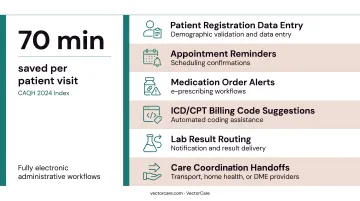
The best candidates share a common profile: high volume, clear rules, measurable outputs, and low tolerance for human error. Specific examples include:
- Patient registration data entry and demographic validation
- Appointment reminders and scheduling confirmations
- Medication order alerts and e-prescribing workflows
- ICD/CPT billing code suggestions
- Lab result routing and notification
- Care coordination handoffs to transport, home health, or DME providers
According to the CAQH 2024 Index, transitioning to fully electronic administrative workflows saves an average of 70 minutes per patient visit. That figure alone makes the ROI case for automation in high-volume practices.
That said, automation delivers those gains only when the underlying conditions are right.
When Automation Is the Wrong Move
Not every workflow is ready for automation. Three conditions predict poor outcomes:
- Automating a broken or poorly defined process scales the dysfunction, not the efficiency
- Systems without interoperability shift the bottleneck rather than eliminate it
- Organizations still in basic EHR training phases will generate more disruption than gains
Complex clinical judgment — diagnosing ambiguous presentations, interpreting conflicting results, managing exceptions — remains the domain of experienced clinicians, not automation rules.
How to Automate Workflows in EHR Systems
Step 1: Audit Your Existing Workflows
Before configuring anything, map every key administrative and clinical workflow currently running through the EHR. For each process, document:
- Which steps are fully manual
- Where data gets re-entered across systems
- Where handoff delays or errors concentrate
- How much staff time goes to data entry versus direct patient care
At the same time, assess your EHR's built-in automation capabilities. Most modern EHRs include clinical decision support rules, automated alerts, and order sets that are available but not yet configured. Identify what's already live versus what's available and unused — unused built-in features often require only configuration, not new software.
Step 2: Define Priorities and Set Measurable Goals
Once you have a workflow inventory, rank automation opportunities using a simple priority matrix:
| Priority | Volume | Error Rate | Complexity | Automate? |
|---|---|---|---|---|
| 1st | High | High | Low | Yes — immediately |
| 2nd | High | Low | Low | Yes — quick wins |
| 3rd | Low | High | Medium | Yes — after foundational work |
| 4th | Low | Low | High | Evaluate carefully |
Set specific success metrics before any configuration begins. Industry benchmarks to anchor your goals:
- Prior authorization: manual processing takes 22 minutes; electronic takes 11 minutes (CAQH 2023)
- Eligibility and benefits checks: manual costs $7.97 per transaction; electronic costs $2.18
- Clean claims target: HFMA recommends a 98% clean-claim rate as the performance standard
- Denial rate target: under 5% is optimal; 5–10% is average
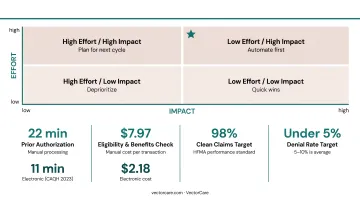
These benchmarks give your team a realistic baseline for measuring progress.
Step 3: Ensure Integration and Interoperability Readiness
Confirm your EHR supports HL7 FHIR APIs before connecting any automation tools or third-party platforms. FHIR (Fast Healthcare Interoperability Resources) is now the regulatory standard for data exchange under the 21st Century Cures Act. It's the technical foundation that makes cross-system automation reliable.
Check that every external system you plan to automate handoffs to — labs, pharmacies, transport coordinators, home health agencies — can send and receive standardized data. This is where most implementations hit their first wall.
Platforms built on SMART on FHIR eliminate manual re-entry at care transitions entirely. VectorCare's Epic integration, for example, automatically extracts patient demographics, encounter data, vital signs, conditions, and insurance coverage when a case manager initiates a transport or discharge request. All logistics updates then write back to the patient chart, maintaining one system of record with no duplicate data entry.
Before go-live, verify:
- Encryption standards for data in transit and at rest
- Role-based access controls and audit trail logging
- HIPAA compliance for all third-party integrations (VectorCare, for instance, holds SOC 2 Type I certification alongside HIPAA compliance)
Step 4: Configure, Test, and Deploy Automation Rules
Start with low-risk, high-volume workflows:
- Appointment reminders — simple logic, measurable no-show impact
- Auto-population of patient demographics — reduces registration errors immediately
- Eligibility verification triggers — fires automatically before scheduled visits
- Billing code suggestions — supports coders without replacing clinical judgment
Once foundational workflows are stable, move to clinical automation: decision support alerts, e-prescribing workflows, automated order sets for common conditions.
Run parallel testing before full deployment. Operate automated and manual workflows simultaneously on a subset of cases. Define acceptable error thresholds before testing begins, and document rollback protocols so the team knows exactly what to do if something fails.
Step 5: Train Staff and Manage the Change
Deployment is only half the work. Staff who don't trust or understand automation will route around it, reintroducing the manual steps you just eliminated.
Effective change management requires two things:
- Role-specific training that shows each team member how automation reduces their specific pain points — not a generic system overview
- Clear workflow ownership — designate a clinical champion per department, responsible for monitoring automation performance and escalating issues
Tools built to embed inside the EHR workflow — rather than requiring staff to context-switch to a separate application — cut the adoption barrier considerably. When clinicians don't have to leave Epic to complete a logistics task, training friction drops and compliance follows.
Key Factors That Determine Automation Success in EHR Systems
Two organizations can implement identical EHR automation features and get dramatically different outcomes. These four variables explain why.
Data Quality and Standardization
Automation is only as reliable as the data feeding it. Inconsistent demographics, duplicate records, and non-standardized clinical terminology cause automation rules to fail silently, generating wrong billing codes, misfired alerts, and failed care handoffs without obvious errors in the log.
The scale of the problem is significant: AHIMA reports that only 22% of healthcare organizations achieve a 1% or lower duplicate record error rate. A 2024 peer-reviewed study found 15% of reviewed EHR charts contained documentation errors related to cancer diagnoses and treatments.
Fix data hygiene before scaling automation. Most modern EHRs include automated data validation tools that catch input errors at the point of entry. Make them mandatory — and enforce them before expanding any automation rules downstream.
Interoperability and System Connectivity
EHR automation cannot operate in silos. Workflows spanning labs, pharmacies, transport networks, and home health agencies require standardized data exchange to function without manual intervention.
The numbers tell a different story. ONC data shows that while 70% of non-federal acute care hospitals engaged in all four interoperability domains in 2023, only 43% did so routinely. And 40% of hospitals still received records by mail or fax at least sometimes.
Without reliable FHIR-based connections, staff end up re-entering data at every system boundary — eliminating the efficiency gains automation was supposed to create.
Governance and Workflow Ownership
Automation rules require ongoing maintenance. Clinical guidelines change, payer requirements update, and edge cases accumulate. Without a designated owner and a regular review cadence, automation rules drift out of alignment with actual workflows.
The most visible symptom of poor governance is alert fatigue. AHRQ PSNet reports that clinicians override safety alerts in 49% to 96% of cases, and that alert fatigue can contribute to medical errors. A JAMIA study found that 39.4% of medication alert overrides were inappropriate — meaning real risks were being dismissed because the signal-to-noise ratio had eroded clinician trust.
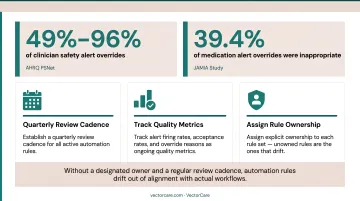
To keep governance functional:
- Establish a quarterly review cadence for all active automation rules
- Track alert firing rates, acceptance rates, and override reasons as ongoing quality metrics
- Assign explicit ownership to each rule set — unowned rules are the ones that drift
Scope of Automation Beyond the EHR
The EHR captures clinical decisions, but it typically can't execute or track fulfillment of downstream logistics. Patient transport requests, DME orders, home health referrals, and NEMT scheduling all originate in the EHR but must route to external providers. Without a bridge platform, staff default to phone calls and manual follow-up.
The cost compounds quickly. Research shows 65% of patients experience delays waiting for rehabilitation services, and 48% experience delays that extend their discharge. Closing this gap requires a platform that bridges EHR-originated orders to external provider networks without manual re-entry.
VectorCare's patient logistics platform does this through a SMART on FHIR integration with Epic, allowing case managers to initiate transport, home health visits, DME delivery, and other post-discharge services directly from within the patient chart. A.D.I. (Automated Dispatching Intelligence) broadcasts requests to the contracted provider network and routes confirmations back to the EHR automatically.
For a 250-bed hospital running 25 daily transports, this saves over $500,000 annually — and that's before accounting for bed-throughput savings from faster discharge execution.
Common Mistakes When Automating EHR Workflows
Most EHR automation failures trace back to the same four mistakes. Recognizing them before deployment is far cheaper than fixing them after go-live.
Automating a broken process. Configuring automation on top of an inefficient manual workflow doesn't fix the inefficiency — it scales it. Document and resolve the underlying process issues first, then automate.
Setting alert thresholds too broadly. Clinical decision support rules that fire too often generate alert fatigue within weeks. Define specific conditions, severity levels, and patient populations for each alert. Audit override rates regularly — a rising rate means the rule needs adjustment, not that clinicians need retraining.
Treating go-live as the finish line. Automation performance degrades as patient populations shift, staff turns over, and clinical guidelines evolve. Organizations that skip post-deployment monitoring often find out through a climbing billing error rate or a failed care handoff. Tie quarterly automation reviews to your baseline success metrics from the planning phase.
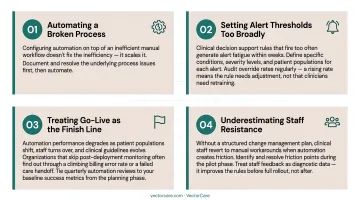
Underestimating staff resistance. Without a structured change management plan, clinical staff revert to manual workarounds when automation creates friction. Identify and resolve friction points during the pilot phase. Treat staff feedback as diagnostic data — it improves the rules before full rollout, not after.
Conclusion
EHR workflow automation delivers its greatest value when organizations invest in three foundational disciplines:
- Process audit first — map existing workflows before automating anything
- Interoperable infrastructure — ensure systems can exchange data reliably across platforms
- Active governance — monitor and update automation rules long after initial deployment
Technology creates the conditions for efficiency. Whether that efficiency holds depends entirely on process discipline and staff adoption.
Treat automation as a continuous improvement program, not a project with a finish line. Organizations that build feedback loops, monitor outcomes against defined metrics, and expand automation into care coordination and patient logistics beyond the EHR see compounding returns over time.
VectorCare's A.D.I. module illustrates this directly. In 2024, the platform saved customers over 10,000 hours. By 2025, that figure had grown to more than 100,000 hours — a tenfold increase built on broader adoption, expanding use cases, and sustained operational investment.
Frequently Asked Questions
What is EHR automation?
EHR automation uses AI, RPA, and rules-based logic to execute repetitive clinical and administrative tasks automatically: data entry, billing code suggestions, appointment reminders, and order alerts. It reduces manual effort, decreases error rates, and frees clinical staff to focus on patient care.
What are examples of workflow automation in EHR systems?
Common examples include automated appointment reminders, clinical decision support alerts, e-prescribing, ICD/CPT code suggestions, auto-population of patient demographics, automated lab result routing, and care transition notifications to transport coordinators, home health agencies, and DME providers.
Which EHR workflows should be automated first?
Start with high-volume, rule-based, low-clinical-risk workflows: patient registration data validation, appointment scheduling reminders, eligibility verification, and billing code recommendations. Once those are stable, progress to clinical decision support alerts and care coordination handoffs.
What is FHIR and why does it matter for EHR automation?
FHIR (Fast Healthcare Interoperability Resources) is the modern standard for exchanging healthcare data between systems via APIs. It allows EHR automation to extend beyond a single system, connecting to labs, pharmacies, transport platforms, and home health providers without manual re-entry at each handoff.
What are the biggest challenges in automating EHR workflows?
The three most common are poor underlying data quality, lack of interoperability between the EHR and downstream systems, and insufficient staff training that leads to manual workarounds. All three should be resolved before go-live — not after automation is already in motion.
How do you measure success after automating EHR workflows?
Define metrics before deployment, not after. Useful measures include reduction in manual data entry time per staff member, decrease in billing denial rates, drop in appointment no-show rates, reduction in alert override rates, and improvements in patient discharge or transfer turnaround times.