When this process is rushed or poorly scoped, the consequences are predictable: duplicate patient records, scheduling failures, HIPAA exposure from misconfigured data transfers, EHR data mismatches, and staff workarounds that defeat the entire purpose of automation.
This guide covers the complete integration process — from readiness checks and EHR connectivity through workflow configuration, validation testing, and troubleshooting the most common failure points.
Key Takeaways
- Integration spans four phases: readiness assessment, EHR/system connectivity, workflow configuration, and validation testing
- Plan for both FHIR R4 and HL7 v2: HL7 v2 is still used by 95% of US healthcare organizations, so neither standard can be ignored
- Missing HIPAA-compliant vendor agreements (BAAs) before connecting clinical data sources is the most common compliance gap
- Single-EHR deployments can go live in weeks; multi-system, multi-site integrations typically require several months of phased rollout
- Skipping end-to-end validation testing before go-live is the single most common cause of post-launch failures
What Is a Healthcare Agent Scheduling System?
A healthcare agent scheduling system is software that uses AI agents or automated dispatching logic to create, coordinate, and manage scheduled healthcare events — clinical appointments, patient transport, care transitions — without requiring manual intervention at every step.
That distinction matters. Standard scheduling tools operate within a single system and rely on human input for each decision. Agent-based systems do more:
- Work across multiple stakeholders — hospitals, transport providers, payers, home health agencies
- Automatically negotiate availability and match resources to requests
- Trigger downstream workflows without waiting for manual handoffs
- Operate continuously across an interconnected provider network
VectorCare's A.D.I. (Automated Dispatching Intelligence) is an example of this agent-based category. It handles patient logistics from scheduling through dispatch across an interconnected provider network, processing 3.23 requests per minute.
Integration is what separates a functional system from a siloed one. A scheduling agent that cannot read from and write to an organization's EHR, transport management system, and payer database operates in isolation — creating exactly the fragmentation it was designed to eliminate.
Before You Begin: Prerequisites and Readiness Checks
Build Your System Inventory First
Before any integration work begins, document every platform the scheduling agent will need to interact with:
- EHR systems (Epic, Cerner/Oracle Health, athenahealth, eClinicalWorks, etc.)
- Patient portals
- Transport management systems
- Payer and prior authorization systems
- Home health or DME platforms
For each system, note whether it's cloud-based or on-premise, and whether it has a published API or FHIR endpoint available.
Confirm EHR API Compatibility
This is non-negotiable. Determine whether your EHR supports:
- FHIR R4 (version 4.0.1): The preferred path. ONC required certified health IT developers to provide certified FHIR APIs by December 31, 2022
- HL7 v2 messaging: Still used by 95% of US healthcare organizations and essential for legacy system compatibility
- Proprietary data exports only: If this is your only option, middleware or an EHR upgrade is required before integration can proceed
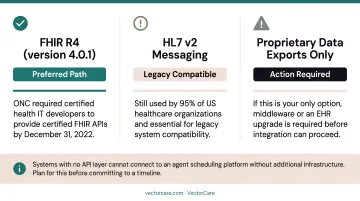
Systems with no API layer cannot connect to an agent scheduling platform without additional infrastructure. Plan for this before committing to a timeline.
Verify HIPAA Compliance and BAA Coverage
Every platform in the data path — the scheduling agent, any middleware, all transit pathways — must be covered under a signed Business Associate Agreement before connecting to any system containing Protected Health Information.
According to HHS's 2024 breach report, business associates were responsible for 16% of large breach reports but 85% of affected individuals. OCR also resolved 12 breach investigations with settlements totaling over $7.8 million that year. Vendor due diligence carries real financial and regulatory consequences.
That risk exposure makes vendor security posture a procurement requirement, not an afterthought. Confirm the vendor operates:
- Encryption in transit and at rest
- Role-based access controls
- Audit logging covering all automated and manual transactions
- Documented incident response procedures
VectorCare, for example, requires a BAA before any PHI flows through the platform and maintains SOC 2 Type I certification alongside real-time alerting on access anomalies and failed authentication attempts.
Assess Internal Governance Readiness
Name a project owner. Get sign-off from both clinical operations and IT leadership. Define who communicates changes to staff before go-live.
A peer-reviewed implementation study found that roughly 50% of EHR implementations have failed, with project leadership and management identified as crucial contributing factors — not just technical issues. A failed governance structure will stall a technically sound integration just as effectively as a missing API endpoint.
Define Scope Before You Start
Decide which workflows go live in Phase 1 versus later phases. Attempting to integrate all systems simultaneously is a common and costly mistake. A focused first phase — transport scheduling only, for example — lets you validate the core integration before extending to home health, DME, or payer connectivity.
How to Integrate a Healthcare Agent Scheduling System
Integration follows a defined sequence: assessment → connectivity → configuration → testing → go-live. Compressing any phase creates data integrity problems that are expensive to fix after launch.
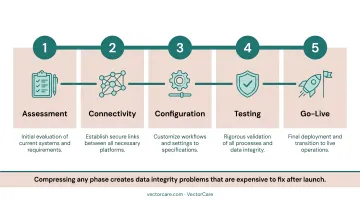
Step 1 — Establish Secure System Connectivity
Set up API connections between the scheduling agent and each target system using the appropriate standard:
- FHIR R4 for modern EHRs with certified API endpoints
- HL7 v2 for legacy systems and departmental interfaces (ADT, transport status, orders)
- REST API for custom integrations where neither standard applies
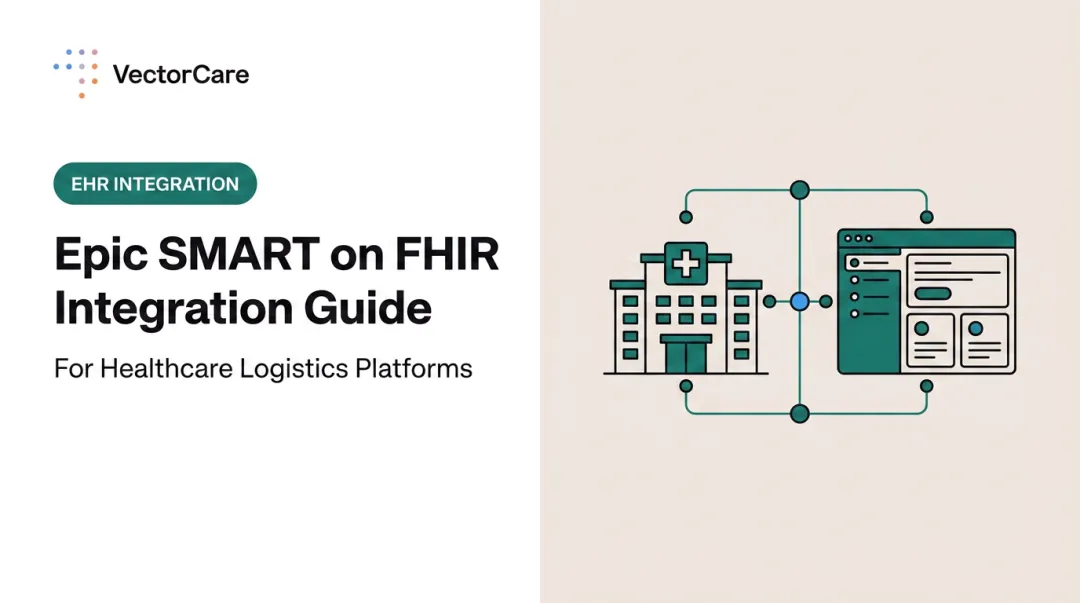
For EHR platforms with native app marketplaces like the Epic Showroom, SMART on FHIR apps accelerate this step by eliminating custom development work. These pre-approved integrations launch directly inside the EHR with patient context already loaded, automatically extracting demographics, encounter details, insurance data, and transport needs.
VectorCare's Epic integration uses this approach. The SMART on FHIR app embeds inside Epic, pulling patient context automatically:
- MRN and demographics
- Attending physician and admission/discharge dates
- Current location and transport needs
This eliminates double-entry entirely. The platform also exchanges FHIR resources — ServiceRequest, Encounter, and DocumentReference — bidirectionally.
For organizations running legacy EHRs without FHIR R4 support, VectorCare Connect supports HL7 v2 messaging as a fallback, along with Epic Bridges interface engine compatibility — no EHR upgrade required.
Step 2 — Configure Data Mapping and Field Alignment
Define how fields in the scheduling system correspond to fields in the EHR and connected platforms. Misaligned mappings — patient ID formats, date/time standards, service-type codes — are a leading cause of scheduling failures and duplicate records.
Work with the vendor's implementation team to validate mappings against live test data before activating any automation. Default field mappings are rarely correct out of the box — confirm each one against your actual environment before go-live.
Step 3 — Build and Validate Scheduling Workflows
Configure the agent's scheduling logic:
- Service type rules and transport type hierarchies (ground vs. air)
- Provider availability feeds and geographic coverage zones
- Priority levels and time-sensitivity thresholds
- Escalation paths when preferred providers are unavailable
- Multi-provider broadcast sequences
VectorCare's Hub no-code workflow builder allows implementation teams and clinical operations staff to configure these rules without writing code — using a drag-and-drop interface to model protocols by care line, payer, or facility type. A.D.I. supports configurable routing logic per payer, facility, and level of service, with automatic fallback and escalation when primary vendors decline requests.
Start with your highest-volume use cases and validate them fully before layering in edge-case logic — catching failures at scale is far easier than untangling them later.
Step 4 — Integrate Notification and Communication Channels
Connect the scheduling agent to every communication touchpoint it will use:
- Staff dashboards and provider alert systems
- Patient notification pathways
- Payer pre-authorization systems (where applicable)
Verify that notification triggers are correctly linked to workflow state changes — not just configured, but tested with actual state transitions.
Step 5 — Run End-to-End Validation Testing Before Go-Live
This step gets cut more often than any other — usually due to timeline pressure — and it's the one that causes the most expensive post-launch failures. Run structured test scenarios that simulate real scheduling events from initiation through completion, covering both normal workflows and edge cases.
Every test run should confirm:
- Correct patient data retrieval from the EHR
- Accurate scheduling logic execution across normal and edge-case scenarios
- Notification delivery at each workflow state change
- Audit trail generation for both human and automated actions
- Fallback behavior when a provider is unavailable
- Role-based access controls restricting data to authorized users only
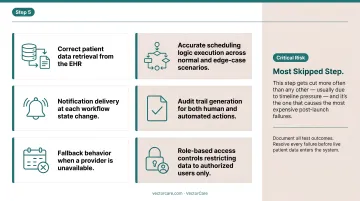
Document all test outcomes. Resolve every failure before live patient data enters the system.
Common Integration Problems and Fixes
Most integration failures are predictable. Identifying them before go-live is far cheaper than unwinding them after.
EHR Connectivity Failures
Problem: The scheduling agent can't reliably read or write to the EHR — appointments aren't syncing, patient data pulls are incomplete, or bi-directional updates fail silently.
Likely causes:
- EHR doesn't support FHIR R4
- OAuth tokens expiring without automatic renewal (SMART on FHIR recommends access token lifetimes no greater than 1 hour — refresh token flows must be configured and tested)
- API scope granted during setup doesn't include required resources (Encounter, Appointment, Patient)
Fix: Audit granted API scopes against the scheduling agent's full data requirements. Confirm refresh token configurations are active. If FHIR resource access is blocked at the permission level, escalate to the EHR vendor's integration support team .
Workflow Configuration Errors Causing Scheduling Gaps
Problem: The agent is creating events but assigning the wrong provider, transport type, or time window — or not escalating when preferred options are unavailable.
Likely causes:
- Scheduling rules configured using incomplete provider availability data
- Service-type codes don't match across systems
- Escalation thresholds were never defined
Fix: Revalidate provider availability feeds and service code mappings against the source system. Re-run test scenarios specifically for edge cases — no available ground transport within the threshold time, for example — to confirm escalation rules fire correctly.
HIPAA and Audit Trail Gaps
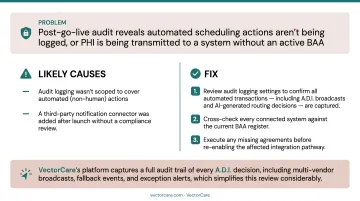
Problem: Post-go-live audit reveals that automated scheduling actions aren't being logged, or that PHI is being transmitted to a system without an active BAA.
Likely causes:
- Audit logging wasn't scoped to cover automated (non-human) actions
- A third-party notification connector was added after launch without a compliance review
Fix: Review audit logging settings to confirm all automated transactions — including A.D.I. broadcasts and AI-generated routing decisions — are captured. Cross-check every connected system against the current BAA register. Execute any missing agreements before re-enabling the affected integration pathway. VectorCare's platform captures a full audit trail of every A.D.I. decision, including multi-vendor broadcasts, fallback events, and exception alerts, which simplifies this review considerably.
Pro Tips for a Successful Integration
Phase by workflow volume and risk. Start with the highest-volume, most standardized scheduling workflows — non-emergency transport requests are the typical starting point — where agent logic can be validated quickly. Extend to lower-volume or more complex coordination types (air medical, multi-leg transfers, home health) only after the core integration is stable. This limits go-live risk and builds internal confidence in the automation.
Document every configuration decision. Data mapping choices, workflow rule logic, escalation thresholds, test results — all of it should live in a shared, accessible format. Healthcare environments experience staff turnover, and undocumented configurations become unmanageable technical debt within months. Include a vendor-led sign-off at each integration milestone.
Plan a parallel-run period. Run both the legacy scheduling process and the new agent system simultaneously on a defined subset of requests. This lets teams compare outcomes, identify discrepancies, and build staff trust in the automation before full cutover.
Rather than targeting a fixed number of days, define go/no-go criteria before you begin:
- Successful message exchange rates within acceptable thresholds
- Exception rates at or below agreed benchmarks
- Reconciled trip and status outcomes across both systems
- Complete audit log coverage for all test transactions
- Verified role-based access controls for all user types
When those criteria are met, cut over.
For context on realistic timelines: a peer-reviewed EHR implementation review found that needs definition typically takes 1–3 months, transition to go-live about one month after deployment and training, and full rollout and adoption up to 6–8 months.
VectorCare's SMART on FHIR integration with Epic compresses the technical portion to 8–12 weeks from decision to go-live. The full adoption cycle still requires a phased approach regardless of how fast the technical handshake completes.
Conclusion
The quality of your integration directly determines whether a healthcare agent scheduling system delivers on its operational promises — reduced manual effort, faster transport coordination, shorter patient length of stay — or simply layers new complexity onto existing problems.
Treat integration as a disciplined, phased project. Each stage builds on the last:
- Invest in readiness assessment before any vendor conversations begin
- Confirm HIPAA-compliant infrastructure before connecting clinical data sources
- Validate data flows and edge cases thoroughly before go-live
- Document every decision, mapping, and exception for ongoing maintenance
Done right, a well-integrated scheduling system reduces coordination delays, cuts manual workload, and gives care teams the real-time visibility they need to move patients through the system faster.
Frequently Asked Questions
What are scheduling systems in healthcare?
Healthcare scheduling systems coordinate the timing of patient-related events — appointments, transport, care transitions, and service requests — across providers, facilities, and support services. Modern agent-based systems automate these tasks with minimal manual input, handling multiple stakeholders simultaneously.
What is FHIR and why does it matter for healthcare scheduling integration?
FHIR (Fast Healthcare Interoperability Resources) is the modern API standard for exchanging healthcare data. Scheduling platforms using FHIR R4 can connect to EHRs like Epic or Cerner faster and more reliably than those relying on older HL7 v2 messaging alone — making FHIR support a key criterion when selecting a scheduling platform.
What EHR systems do healthcare agent scheduling platforms typically integrate with?
Commonly supported EHRs include Epic and other FHIR-compliant EHRs, athenahealth, and eClinicalWorks. The depth of integration varies by vendor — VectorCare Connect, for example, offers native SMART on FHIR apps for Epic, while also supporting HL7 v2 messaging for legacy systems that don't support FHIR R4.
How long does it take to integrate a healthcare agent scheduling system?
Timelines vary by scope. A single-EHR SMART on FHIR deployment can go live in 8–12 weeks. Multi-system, multi-site integrations covering transport, home health, and payer connectivity typically require several months of phased rollout — full adoption extends well beyond the technical go-live date.
Does a healthcare agent scheduling system need to be HIPAA-compliant?
Yes. Any platform that accesses, processes, or transmits Protected Health Information must meet HIPAA requirements. Before connecting the scheduling system to any clinical data source, organizations must execute a Business Associate Agreement with the vendor. This is a legal obligation under HIPAA, not an optional step.
What is the difference between a scheduling system and a patient logistics platform?
Scheduling systems typically manage appointment booking within a single care setting. Patient logistics platforms like VectorCare go further — coordinating transport, home health, DME, care transitions, and payer authorization across multiple providers, with AI-driven automation handling dispatch and escalation without manual intervention.