Introduction
EHR systems were sold as the solution to administrative burden. For most care teams, they've become the source of it.
Ambulatory physicians now average 3.4 hours in the EHR for every 8 hours of scheduled patient time — and in specialties like infectious disease, that figure reaches 8.4 hours. Clinicians are spending more time documenting care than delivering it.
Administrative staff face the same pressure: scheduling, billing, and care coordination tasks routinely consume entire shifts before patient-facing work gets a look-in.
The irony: the same EHR infrastructure generating this burden can eliminate most of it. The right automations, layered on top of existing systems, change that equation completely.
This article covers 9 specific workflows across three categories: clinical documentation and decision support, administrative and scheduling tasks, and care coordination at the edges of care. Each one targets a concrete bottleneck — and together, they add up to measurable reductions in documentation time, claim denials, and discharge delays.
Key Takeaways
- Physicians lose hours each shift to EHR documentation; automation tackles the highest-volume, lowest-clinical-value tasks first
- The 9 workflows cover documentation, scheduling, billing, and care coordination, each targeting a specific bottleneck
- Partial or full implementation reduces manual effort, lowers error rates, and improves patient throughput
- FHIR-based integrations now extend EHR automation beyond the core system into transport, post-acute placement, and discharge coordination
Why EHR Workflow Automation Can't Wait
The documentation burden isn't a minor inconvenience — it's a structural drain on clinical capacity.
Primary care physicians spend nearly 2 hours on EHR tasks for every 1 hour of direct patient care, with roughly 5.9 hours of an 11.4-hour workday in the EHR. Manual workflows compound the problem — generating documentation errors, missed follow-ups, delayed authorizations, and revenue leakage.
The burnout connection is direct. Research published in Mayo Clinic Proceedings found that each 1-point improvement in EHR usability was associated with 3% lower odds of physician burnout. The clerical burden — inbox messages, inbox management, after-hours charting — consistently ranks as a top burnout driver.
The case for acting now:
- AI scribing, natural language processing, and FHIR interoperability are no longer pilots — health systems are running them in production today
- Two in three hospitals already use FHIR APIs to enable data sharing, meaning the infrastructure exists
- Automation is no longer a multi-year IT overhaul — it's a configurable layer on top of existing EHR systems
The barrier to starting has dropped. What hasn't changed is the daily toll of not starting — on clinicians, on patients, and on the bottom line.
Workflows #1–3: Automating Clinical Documentation and Decision Support
Workflow 1: AI Scribes and Ambient Documentation
AI scribe tools listen to patient encounters in real time and generate structured clinical notes automatically. Physicians review and sign rather than draft from scratch, which cuts dictation time, eliminates after-hours charting, and clears the documentation backlog that builds across a full clinic day.
The scale of impact is documented: Permanente Medical Group reported 15,000 physician hours saved after 2.5 million ambient AI scribe uses in a single year. Secondary benefits include restored eye contact during encounters and improved patient interaction scores — physicians aren't looking at a screen while patients are talking.
Most major EHRs now support ambient documentation integrations, and adoption has moved well past pilot programs into routine clinical use.
Workflow 2: Clinical Decision Support (CDS) Automation
EHRs can automatically surface medication interaction alerts, allergy flags, preventive care reminders, and evidence-based care pathway suggestions at the point of care — without the clinician manually searching for guidance.
The medication safety evidence is strong. A JAMIA meta-analysis found that CPOE with clinical decision support reduced the likelihood of prescribing errors by 48% in hospital settings. Well-configured CDS also reduces cognitive load: instead of holding every drug interaction or screening interval in memory, the system flags what matters when it matters.
That qualifier matters. Poorly tuned CDS generates alert fatigue — too many low-value notifications that clinicians learn to dismiss. Getting CDS right requires:
- Limiting alerts to high-acuity, actionable findings
- Suppressing notifications clinicians have already addressed
- Reviewing and adjusting thresholds regularly as clinical patterns shift
Configuration and ongoing tuning carry as much weight as the initial deployment.
Workflow 3: Automated Lab Orders and Results Routing
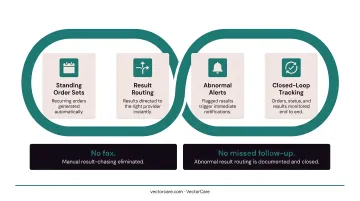
Standing order sets and automated result routing eliminate two common failure points: manually generating recurring lab orders and chasing results across systems.
When a result arrives, the system routes it to the right provider automatically. No fax. No message left with a nurse who's covering three other patients. Missed or delayed follow-up of abnormal test results is a documented contributor to missed and delayed diagnoses — automated routing directly addresses that gap.
The workflow also supports closed-loop tracking: orders are generated, status is monitored, and results trigger alerts when they arrive. Nothing falls through because someone forgot to check.
Workflows #4–6: Streamlining Administrative and Scheduling Tasks
Workflow 4: Patient Scheduling and Appointment Reminders
Automated scheduling platforms allow patients to self-schedule, fill cancellation slots in real time, and receive reminders across multiple channels — text, email, or app notification — without front-desk involvement.
Cochrane systematic review evidence shows attendance rates of 67.8% without reminders versus 78.6% with mobile phone messaging reminders — roughly an 11-point improvement. That gap translates directly into filled appointment slots, reduced scheduling waste, and lower front-desk call volume.
Multi-channel and targeted reminders (sent based on predicted no-show risk) improve performance further. Most EHR scheduling modules support this integration out of the box, making deployment relatively low-lift compared to the return.
Workflow 5: Insurance Eligibility Verification and Prior Authorization
Real-time eligibility checks verify patient coverage before appointments — catching gaps before they become claim denials. Prior authorization workflows replace phone calls and faxes with structured digital submissions that move faster and create an audit trail.
The CAQH 2023 Index Report found the medical industry spent $1.3 billion more on prior authorizations than the previous year, driven by higher volume and manual processing overhead.
Catching eligibility issues before a visit — rather than after a denial — directly reduces revenue leakage. Electronic checks typically run in seconds against payer databases, with no staff action required on routine verifications:
- Flags coverage gaps before the patient arrives
- Eliminates phone-based eligibility calls for standard verifications
- Creates a timestamped audit trail for every prior auth submission
Workflow 6: Medical Billing, Coding, and Claims Processing
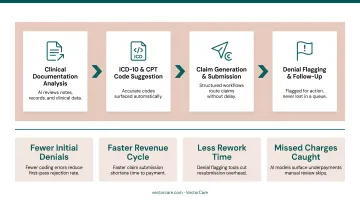
AI-assisted coding analyzes clinical documentation and suggests accurate ICD-10 and CPT codes, reducing manual coding effort and improving consistency. Claims are generated and submitted through structured workflows, with denials flagged for follow-up rather than lost in a queue.
The revenue cycle impact compounds quickly:
- Fewer coding errors mean fewer initial denials
- Faster claim submission shortens the revenue cycle
- Denial flagging tools reduce rework and resubmission time
- AI models trained on clinical documentation catch missed charges and underpayments that manual review skips
Coding errors are a primary driver of claim denials and compliance exposure. AI-assisted coding shifts staff from routine code selection to exception handling — where their judgment actually matters.
Workflows #7–9: Automating Care Coordination and Patient Logistics
The first six workflows address tasks inside the EHR. These final three target the handoffs at the edges of care — discharge, transfer, and post-acute placement — where manual coordination creates the longest delays and the most communication failures.
Workflow 7: Automated Discharge Planning and Bed Management
EHR automation can trigger discharge checklists, post-discharge care instructions, and follow-up appointment scheduling based on documented care plans — replacing the manual back-and-forth between case managers, nurses, and bed management teams.
The Cochrane review of discharge planning found that structured, individualized discharge plans probably reduce initial hospital length of stay and readmissions for older medical patients. When the next steps are automated rather than delegated verbally, they actually happen on time.
Delayed discharge is one of the most persistent capacity problems in hospitals, and most of that delay isn't clinical — it's administrative. Automated discharge workflows address that gap directly. Key functions include:
- Triggering care instructions and follow-up scheduling the moment discharge criteria are met
- Notifying bed management teams in real time rather than via phone or pager
- Routing post-discharge care plans to receiving providers without manual handoff
- Flagging incomplete documentation before it stalls the departure process
Workflow 8: Patient Transfer and Transport Coordination
When a patient needs inter-facility transfer or non-emergency transport, the traditional process is phone calls to multiple providers, faxed clinical summaries, and manual re-entry of patient data that the EHR already contains. Each step adds delay and introduces error.
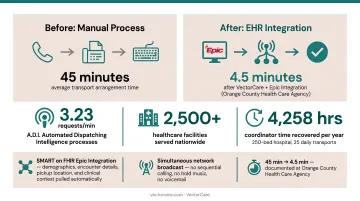
EHR integration with a patient logistics platform automates this handoff entirely. VectorCare's SMART on FHIR Epic integration is a working example: when a care coordinator initiates a transport request from within Epic, the platform automatically pulls patient demographics, encounter details, pickup location, and clinical context through FHIR APIs.
The request then broadcasts simultaneously to a network of vetted transport providers, with no sequential calling, no hold music, and no voicemail.
VectorCare's A.D.I. (Automated Dispatching Intelligence) processes 3.23 requests per minute across its network. That processing throughput, serving over 2,500 healthcare facilities nationwide, represents what automation at scale looks like in patient logistics.
The time impact is documented: Orange County Health Care Agency reduced average transport arrangement time from 45 minutes to 4.5 minutes after implementing VectorCare's platform. For a 250-bed hospital running 25 daily transports, that difference translates to roughly 4,258 hours of recovered coordinator time per year.
Workflow 9: Post-Acute Care Placement and Referral Automation
Most discharge delays don't happen during the clinical decision. They happen during the administrative handoff to post-acute providers: the calls to skilled nursing facilities, the faxed referral packets, the follow-up calls to confirm bed availability.
EHR automation can generate referral packets from structured patient record data and route them to SNFs, home health agencies, and DME providers without manual coordination. VectorCare's platform integrates this entire sequence into the Epic discharge workflow, giving case managers real-time visibility into every post-discharge leg: transport home, equipment delivery, and the first home health visit.
Research on neurology inpatients found that post-acute placement delays directly caused measurable medically unnecessary hospital days. Automating the referral and placement workflow reduces those avoidable bed days and lowers readmission risk by ensuring the post-discharge plan executes on schedule.
How to Choose and Implement EHR Workflow Automations
Start With High-Impact, Lower-Complexity Automations
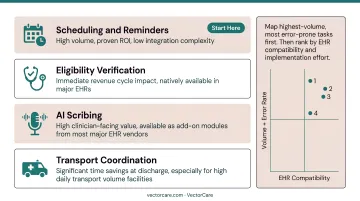
Not all nine of these make sense to tackle simultaneously. Common starting points:
- Scheduling and reminders — high volume, proven ROI, low integration complexity
- Eligibility verification — immediate revenue cycle impact, usually available natively in major EHRs
- AI scribing — high clinician-facing value, available as add-on modules from most major EHR vendors
- Transport coordination — significant time savings at discharge, especially for facilities with high daily transport volume
Map your highest-volume, most error-prone manual tasks first. Then rank by EHR compatibility and implementation effort — which brings the compliance and integration requirements directly into your evaluation.
Integration and Compliance Requirements
Any automation that touches patient data must meet these baseline requirements:
- FHIR R4 compatibility — verify the vendor supports your EHR version and integration method
- SMART on FHIR for embedded apps — allows tools to launch within the EHR without context-switching
- Signed BAA — required for any vendor handling PHI on your behalf
- HIPAA security controls — encryption in transit (TLS 1.2 minimum), audit logging, access controls
- SOC 2 Type I certification — increasingly standard for healthcare SaaS vendors
For Epic specifically, look for vendors listed on the Epic Showroom — that listing indicates the app has passed Epic's technical review process.
Change Management Determines Adoption
The most common reason EHR automations fail is adoption, not the technology.
Before go-live:
- Define success metrics — documentation time, no-show rates, claim denial rates, transport arrangement time
- Involve clinical and administrative staff early in workflow design
- Identify champions in high-volume units who will drive adoption
At go-live:
- Start with a single unit or use case, not a system-wide rollout
- Track metrics weekly and share results with the team
Ongoing:
- Build a continuous optimization loop — each deployment phase generates data that informs the next
- Tune CDS alerts to reduce fatigue as usage data accumulates
Teams that start small, measure early, and iterate consistently tend to see faster ROI — and far fewer abandoned implementations six months post-launch.
Frequently Asked Questions
What is the EHR workflow process?
An EHR workflow is the sequence of digital steps covering patient registration, documentation, ordering, billing, and data sharing that clinicians and administrative staff follow to manage patient care. Automation targets the steps in that sequence that are high-volume, repetitive, and don't require clinical judgment to complete.
What are the best tools to automate workflow in EHR systems?
Major EHRs like Epic, Oracle Health (Cerner), and athenahealth include native automation features for scheduling, CDS, and billing. Specialized tools extend those capabilities including AI scribing platforms for documentation, prior authorization tools for revenue cycle, and patient logistics platforms like VectorCare for transport coordination, post-acute placement, and discharge management.
What EHR workflows take the most time to complete manually?
Clinical documentation, prior authorization, insurance eligibility verification, and patient transfer coordination top the list of time-cost manual tasks. Documentation alone can consume a third or more of a physician's working hours; prior auth adds substantial weekly burden on top of that.
How does FHIR integration help automate EHR workflows?
FHIR (Fast Healthcare Interoperability Resources) is an open standard that lets EHRs share structured patient data with external platforms. Automations for transport ordering, referral management, and post-acute placement can then pull that data directly from the EHR, removing manual re-entry and keeping those tools inside the clinical workflow.
Can EHR automation help reduce physician burnout?
Yes. Administrative burden is one of the top drivers of burnout: after-hours charting, inbox management, and repetitive data entry add up fast. Automating documentation, eligibility checks, and coordination tasks cuts the work that keeps physicians at their keyboards long after patients leave.
How do EHR automations improve discharge and transfer coordination?
Automated discharge checklists, post-acute referral workflows, and EHR-integrated transport platforms reduce the manual work required at care transitions. The result is faster discharge execution, shorter length of stay, and lower readmission risk, since the post-discharge plan is coordinated automatically rather than tracked informally through phone calls.