 Guide](https://file-host.link/website/vectorcare-o874qh/assets/blog-images/07b41f45-6837-4562-97a0-d0ed9293d5b4/1783000562326385_f660e2041b89412d870385b922f87828/360.webp)
Teams unfamiliar with HL7 FHIR R4, OAuth 2.0 flows, or Epic's Connection Hub routinely underestimate what's involved. The technical build is only part of the challenge — coordinating across IT, compliance, and clinical leadership while navigating Epic's review cycle adds weeks or months to even well-resourced projects.
The consequences of doing this poorly are concrete: token refresh failures in production, 403 errors from misconfigured scopes, failed Epic Showroom reviews that require full resubmission, and integrations that break when Epic pushes version updates. This guide covers the full integration lifecycle — from prerequisites and technical setup through post-integration validation — so your team can move through it systematically rather than reactively.
Key Takeaways
- Epic fully supports SMART on FHIR via OAuth 2.0; all third-party apps must register through the Epic Connection Hub before accessing FHIR R4 APIs in production
- Integration spans app registration, OAuth2 setup, FHIR resource queries, sandbox testing, and Epic Showroom review — in that order
- Governance and security review add significant time beyond technical development; plan accordingly
- Sandbox validation is non-negotiable; production environments behave differently and will catch teams that skip thorough testing
- Embedded logistics apps — like patient transport coordination — cut delays and reduce manual handoffs when built directly into Epic's clinical interface
Epic SMART on FHIR Integration Overview
Getting Epic SMART on FHIR integration right requires following a defined sequence — and understanding why the order matters:
App registration → OAuth2 authentication setup → FHIR resource query configuration → Sandbox testing → Epic Showroom review → Production deployment
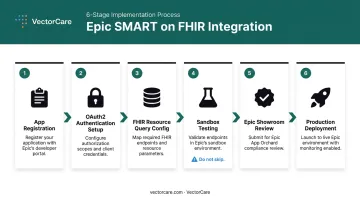
Each phase has dependencies on the previous one. Skipping sandbox validation to accelerate production go-live is the most common cause of rework: Epic configurations vary meaningfully across customer environments, and issues that don't surface in sandbox frequently appear at go-live.
Multi-team coordination is standard. IT, compliance, and clinical leadership all have roles in this process, and the governance layer (particularly the Epic Showroom review) operates on its own timeline independent of how polished the technical implementation is.
Prerequisites and System Readiness
Before writing a line of integration code, confirm these are in place:
- Vendor account registered in the Epic Connection Hub (fhir.epic.com/Developer/Apps)
- Epic's sandbox environment accessible for non-production testing
- A defined use case mapped to supported FHIR R4 resources (Epic's R4 support has been available since its earlier FHIR API rollout (around 2019–2020); the FHIR specifications catalogue lists available APIs)
- Resource availability confirmed for your target Epic environment — verify that Patient, Encounter, Observation, Condition, MedicationRequest, Coverage, or whichever resources your use case requires are present in that environment's configuration
- HIPAA-compliant data handling confirmed before integration begins, including data storage, transmission encryption, and access logging requirements
These prerequisites set the foundation. Before moving to production configuration, three rules apply without exception:
- Complete sandbox validation first, every time
- Request only the scopes your use case actually requires — Epic reviews scope justification during approval, and speculative scope requests are a common reason reviews stall
- Identify any Epic-specific extensions or profile constraints that apply to your target resources
Technical Requirements
The core components your integration needs:
| Component | Required | Notes |
|---|---|---|
| OAuth 2.0 / OIDC authorization server | Yes | Must align with Epic's discovery document |
| Redirect URI (per environment) | Yes | Sandbox and production URIs must be separate |
| Client ID from Connection Hub | Yes | PROD and NONPROD IDs are distinct |
PKCE (S256) |
Yes for public clients | Epic's discovery endpoint lists S256 in code_challenge_methods_supported |
| Client credentials | Yes for confidential clients | Epic supports client_secret_post, client_secret_basic, private_key_jwt |
| Proactive token refresh logic | Yes | refresh_token is listed in Epic's grant_types_supported |
.well-known/smart-configuration endpoint discovery |
Yes | Required to retrieve authorization and token endpoint URLs dynamically |
| SMART JS client library | Optional | Simplifies launch parameter handling; not mandatory if your team manages the auth flow manually |
Epic's SMART configuration endpoint (fhir.epic.com/interconnect-fhir-oauth/api/FHIR/R4/.well-known/smart-configuration) returns authorization and token endpoints, supported grant types, PKCE methods, client capabilities, and JWKS URI. Query this endpoint first. Hardcoding URLs without checking the discovery document is a reliable way to break your integration when Epic updates its configuration.
Step-by-Step: How to Complete the Epic SMART on FHIR Integration
The integration follows a defined sequence. Combining steps — particularly conflating sandbox testing with production readiness — is the most common source of rework and review failures.
Step 1 — Register the Application
Log in to the Epic Connection Hub and create your application:
- Define the application type: EHR-launched (initiates from within the clinician's existing Epic session) or standalone (initiates independently, then connects to Epic)
- Enter redirect URI(s) for each environment — sandbox and production URIs are separate entries
- Specify the clinical use case clearly; this becomes part of the scope justification Epic evaluates during review
- Obtain your sandbox Client ID — do not use this in production; PROD and NONPROD client IDs must not be interchanged
Step 2 — Discover Endpoints and Construct the Authorization Flow
Query /.well-known/smart-configuration on the Epic FHIR server to retrieve the authorization_endpoint and token_endpoint dynamically. Epic's sandbox authorization endpoint is https://fhir.epic.com/interconnect-fhir-oauth/oauth2/authorize.
Build the authorization URL with these required parameters:
response_type,client_id,redirect_uri,scope,state,aud- For EHR-context launches: include the
launchparameter — this binds the session to the existing clinician workflow and is not optional for EHR launches
Redirect the user to authenticate via Epic's authorization server.
Step 3 — Exchange the Authorization Code for an Access Token
After Epic redirects back with an authorization code, POST to the token endpoint (https://fhir.epic.com/interconnect-fhir-oauth/oauth2/token) with:
code,grant_type,redirect_uri,client_id
Store the returned access token securely. Implement proactive token refresh logic immediately — refresh before expiry, not after a failed API call.
Epic's discovery document confirms refresh_token grant type support and permission-offline capability. Including offline_access in your scopes allows refresh tokens that remain valid beyond the active session.
Step 4 — Query Patient Data via FHIR Resources
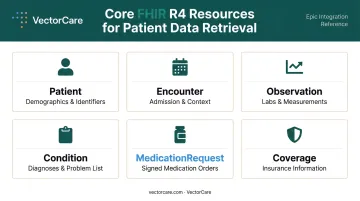
Use the access token as a Bearer token in the Authorization header. Query resources relevant to your use case from Epic's FHIR R4 catalogue:
- Patient — demographics and identifiers
- Encounter — current patient context and admission details
- Observation — labs and clinical measurements
- Condition — problem list and encounter diagnoses
- MedicationRequest — signed medication orders
- Coverage — patient insurance information
Apply precise search filters using supported parameters to avoid profile violations or oversized response bundles.
For operational apps like patient transport coordination, patient demographics, encounter context, and coverage data are typically the highest-value retrieval targets.
VectorCare's SMART on FHIR app, listed on Epic Showroom, automatically extracts this data at the point of transport initiation, eliminating manual re-entry across disconnected systems.
Step 5 — Submit for Epic Showroom Review
Epic's review covers security configuration, OAuth2 setup, scope justification, and HIPAA compliance documentation. Treat the review checklist as an engineering deliverable:
- Document scope rationale for every scope requested
- Detail your encryption approach, audit logging, and session management
- Confirm your declared use case matches the FHIR resources your app actually accesses
- Plan for iteration — revision requests during review are common
Once approved through the Epic Connection Hub review, you can list the app in the Epic Showroom — the public marketplace where Epic customers discover available apps. A Showroom listing is optional and a separate paid service; a listing is not required for customers to connect to your app.
Post-Integration Testing and Validation
Before production deployment, validate in Epic's sandbox using realistic clinical scenarios:
Technical validation checklist:
- Patient context is correctly passed during EHR launch
- Authorization code exchange succeeds across all launch contexts
- FHIR resource queries return expected data shapes
- Token refresh completes without user re-authentication
- Scope restrictions are enforced as configured
User acceptance testing (UAT): Conduct UAT with clinicians or administrators who will use the app in their actual workflow. The app must embed cleanly within Epic's interface — no separate logins, no redundant data entry. If it adds steps instead of removing them, clinicians will route around it regardless of technical correctness.
Why sandbox validation matters for production: Epic configurations vary by customer environment. Redirect URIs, scope configurations, and SMART launch parameters can behave differently in production than in sandbox, particularly in customer-configured environments. Teams that skip thorough sandbox validation consistently encounter environment-specific failures at go-live that require emergency patches after deployment.

Common Epic SMART on FHIR Integration Problems and Fixes
OAuth 2.0 Authentication Failures
Problem: Authorization flow fails or returns a 401 during token exchange or API calls.
Likely cause: Redirect URI mismatch between what's registered in the Connection Hub and what the app sends at runtime; or the access token has expired and the app is making reactive rather than proactive refresh calls.
Fix: Store all redirect URIs in environment-specific configuration — never hardcoded. Implement token refresh logic that runs before expiry. Separate sandbox and production configurations entirely.
Scope Mismatches and Access Errors
Problem: API calls return 403 Forbidden even when the access token is valid.
Likely cause: As Epic's documentation confirms, resources require corresponding OAuth 2.0 scopes; missing scopes prevent resource data from being returned. The requested scopes either weren't approved during review or don't match the resource and operation being attempted.
Fix:
- Request only the narrowest read scopes your use case requires
- Audit granted scopes against actual API calls during sandbox testing before submitting for Epic review
- If Epic returns
403with no response body, the issue is typically with the client configuration rather than a data-level permission
Epic Showroom Review and Approval Delays
Problem: The app functions in sandbox but the Showroom review stalls or returns revision requests.
Likely cause: Incomplete security documentation, overly broad scope justifications, HIPAA compliance gaps, or misalignment between the declared use case and the FHIR resources the app actually accesses.
Fix: Treat the review checklist as an engineering document. Document scope rationale, encryption approach, audit logging, and session management explicitly before submission — these are technical deliverables, not legal formalities.
Pro Tips for a Successful Epic SMART on FHIR Integration
A few patterns separate integrations that go live cleanly from the ones that stall at the finish line:
- Build token refresh into your architecture on day one, not after launch. Sandbox sessions are short-lived and won't surface refresh failures the way production sessions will.
- Keep sandbox, staging, and production environments strictly separate — each needs its own client IDs, redirect URIs, and credentials. Treating them as interchangeable is a leading cause of go-live failures.
- Design for clinician workflow first. An app that embeds cleanly within Epic without requiring separate logins or redundant data entry drives adoption; technically sound apps that disrupt existing workflows face resistance regardless of their quality.
- Healthcare vendors looking to deploy EHR-embedded applications without building full SMART on FHIR infrastructure from scratch may want to watch VectorCare's SoFaaS (SMART on FHIR as a Service) platform, available now, which is built to reduce deployment timelines from months to weeks.
Conclusion
The quality of your Epic SMART on FHIR integration determines whether the app delivers clinical value or becomes a maintenance burden. Authentication errors, scope mismatches, and failed Showroom reviews are all preventable: the difference is whether the integration is approached as a disciplined, sequenced process or a technical sprint.
Take an incremental approach: prove one launch context, validate one FHIR resource workflow, complete one round of UAT with actual clinicians. Teams that move this way reach stable production deployments faster than those who attempt to build everything simultaneously. VectorCare's own path to Epic Showroom — including the Medical Transfer Protocol app launched with Priority Dispatch Corp — followed exactly this pattern. The governance overhead is real, but it's navigable when you sequence the work deliberately.
Frequently Asked Questions
Does Epic support SMART on FHIR?
Yes. Epic fully supports SMART on FHIR using OAuth 2.0, covering both EHR-launched and standalone launch contexts for patients and providers. All API access is governed through the Epic Connection Hub, and apps must complete registration and review before accessing Epic's FHIR R4 APIs in production.
Does Epic support FHIR subscriptions?
Epic's current FHIR R4 API catalogue supports resource query and bulk export patterns. HL7 defines the FHIR R4 Subscription resource, but Epic has not published a general R4 Subscription API in its public catalogue. Check Epic's FHIR specifications for current support status before building subscription-dependent architecture.
How does SMART on FHIR work?
SMART on FHIR layers an OAuth 2.0 / OIDC authorization framework on top of the FHIR data standard. Third-party apps can launch securely within an EHR context, inherit the clinician's active session via the launch parameter, and access patient data through authorized API calls — without requiring a separate login.
What is the difference between FHIR and SMART on FHIR?
FHIR is the data and API standard governing how clinical information is structured and exchanged. SMART on FHIR is the security and launch framework that governs how apps authenticate, launch within an EHR, and are granted access to that FHIR data. In practice, you need both: FHIR to define the data, and SMART on FHIR to control who accesses it.
How long does an Epic SMART on FHIR integration typically take?
Technical development often takes 4–12 weeks, but governance, security review, and Epic Showroom approval can extend the full timeline to 6–12 months or more. Multi-team coordination across IT, compliance, and clinical leadership is standard — budget for it early.
What FHIR resources does Epic expose for patient data retrieval?
Epic's FHIR R4 APIs expose resources including Patient, Encounter, Observation, Condition, MedicationRequest, and Coverage, though available resources and supported search parameters vary by Epic environment and customer configuration. See the Epic FHIR specifications catalogue for the full current list.