Key Takeaways
- A billing dashboard consolidates invoices, payment statuses, outstanding balances, and financial summaries into a single real-time view
- Core components include invoice tracking, payment history, overdue alerts, contract management, and financial charts — each surfaced without manual digging
- Dashboards enable action; billing reports document history — both serve different, complementary purposes
- In healthcare, NEMT, home health, and DME billing complexity makes unified dashboards especially critical
- HIPAA compliance is non-negotiable for any dashboard that handles patient-linked billing data in healthcare settings
Introduction
Billing teams in healthcare know the drill: one system holds the invoices, another tracks payment status, a third manages contracts, and the spreadsheet sitting in someone's email is the only place where all three come together — until it's out of date.
This kind of fragmented setup costs real money. According to the CAQH 2024 Index, manual claim-status inquiries average 24 minutes per transaction compared to just 7 minutes electronically — and there's an estimated $18.3 billion (CAQH 2023 Index) in annual savings available by moving remaining manual administrative processes to fully electronic workflows.
A billing dashboard is the operational tool that makes that shift possible. Below, we cover what a billing dashboard is, what it typically includes, and how it works — with a focus on the complex billing workflows common in healthcare organizations.
What Is a Billing Dashboard?
A billing dashboard is a centralized, real-time interface that consolidates all billing-related information — invoices, payment statuses, outstanding balances, subscriptions, and financial summaries — into a single view. For healthcare organizations managing billing across multiple service providers, transport vendors, or payer contracts, that single view replaces a tangle of spreadsheets and disconnected systems.
What a Billing Dashboard Actually Shows You
A basic billing page shows you transactions. A billing dashboard shows you the state of your finances — what's open, what's overdue, what's been collected, and what needs attention today. It's dynamic and visual, not just a ledger.
Who Uses Billing Dashboards?
Three distinct user groups rely on them:
- Finance and operations teams reconciling invoices and tracking cash flow across accounts
- Platform administrators monitoring contract value, usage limits, and vendor payment activity
- Clients or partner organizations accessing billing history and payment options through a self-service portal
Internal vs. External Views
Many modern software platforms offer both:
- Internal dashboards give finance staff a complete view across all accounts, service categories, and payment statuses
- External (client-facing) portals let customers view their own invoices, update payment methods, and pay balances without contacting the vendor directly
The difference isn't cosmetic — internal users need full account visibility and exception management, while external users need self-service access to their own data. Designing for both is what separates a functional billing tool from one that actually reduces support overhead.
Key Components of a Billing Dashboard
Billing dashboards vary in depth and labeling across platforms, but the core components remain consistent — and understanding them helps you evaluate whether a dashboard will actually fit your workflow.
Invoice Summary and Status Tracking
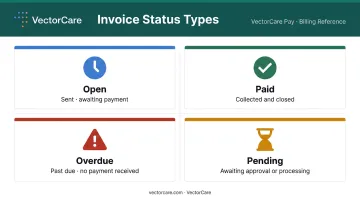
The centerpiece of any billing dashboard is a real-time view of all invoices organized by status:
- Open — sent, awaiting payment
- Paid — collected and closed
- Overdue — past due date with no payment received
- Pending — awaiting approval or processing
Staff can see at a glance what needs attention — no digging through records to find the three overdue invoices buried in a 200-row list.
Payment Methods and History
Users — and in client-facing portals, clients themselves — can view stored payment methods, update card or bank account details, and access a complete transaction history showing dates, amounts, and payment methods used.
Outstanding Balances and Action Items
A dedicated alerts section surfaces overdue invoices, pending approvals on estimates or proposals, and other time-sensitive items. This triage view helps billing coordinators prioritize their morning without sorting through a full invoice list to find what's urgent.
Subscription and Contract Management
For organizations managing service contracts or recurring billing arrangements, dashboards display:
- Active subscriptions and renewal dates
- Contract limits and usage-to-date
- Flags when utilization approaches overage thresholds or renegotiation triggers
Financial Performance Summaries
Scorecard widgets and trend charts translate raw invoice data into usable insights — collected revenue vs. outstanding amounts, net totals by period, and patterns over time. These visuals let leadership spot seasonal spikes or a creeping overdue balance before it becomes a cash flow problem.
How a Billing Dashboard Works
Data Aggregation
A billing dashboard pulls data from multiple sources and presents it in one place:
- Invoicing and billing systems
- Payment processors
- CRM, EHR, or contract management platforms
- Service dispatch or logistics systems
That data either refreshes in real time or on a set schedule — hourly, daily, or at user-defined intervals depending on the platform.
Filtering and Drill-Down
Users can typically filter by:
- Time range (this week, this quarter, custom)
- Account or client
- Service category or department
- Payment status
This lets a billing coordinator move from a high-level summary to a specific transaction in a few clicks — without exporting data to a spreadsheet first.
Role-Based Access Control
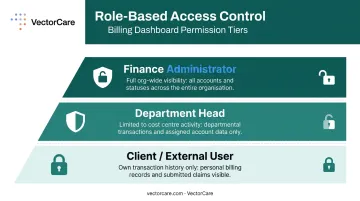
That filtering capability works hand-in-hand with role-based permissions, which control what each user can see in the first place. Finance administrators have full visibility across the organization. Clients see only their own transaction history, while department heads are limited to their cost center's activity. Sensitive financial data stays protected — without locking out the people who actually need it to do their jobs.
Billing Dashboard vs. Billing Report: What's the Difference?
Billing dashboards and billing reports look similar on the surface, but they answer different questions entirely.
| Billing Dashboard | Billing Report | |
|---|---|---|
| Nature | Live, interactive interface | Static historical snapshot |
| Primary use | Monitor current status, take action | Audit, reconciliation, compliance |
| Audience | Operations, billing teams, clients | Finance leadership, accountants, regulators |
| Updated | Real-time or near real-time | Generated on demand at a point in time |
The two are complementary, not competing. Dashboards direct attention to what needs action now. Reports provide the documented evidence needed for end-of-period reconciliation, finance reviews, or external audits.
Teams that rely exclusively on reports often discover billing problems weeks after they occur. Teams that skip reports lack the audit trail regulators and finance leadership require. Both tools earn their place in a complete billing workflow.
Billing Dashboards in Healthcare Operations
Healthcare billing is structurally more complex than most industries. NEMT, home health, DME, and ambulance services each generate their own invoices and service records — often across multiple vendors, payers, and authorization systems simultaneously. A transport record tied to a Medicaid beneficiary might involve a broker, a contracted transport provider, a payer capitation arrangement, and a state reimbursement claim all at once.
The scale is significant. MACPAC data shows that approximately 3.2 million Medicaid beneficiaries used NEMT services on more than 60 million ride-days in a single fiscal year, with state and federal spending reaching $2.6 billion — and that excludes managed-care payments. At that volume, manual billing coordination isn't just inefficient; it's a financial risk.
A HHS OIG audit of one state's NEMT billing found at least $14 million in improper Medicaid payments across a single review period — illustrating what happens when eligibility verification, trip documentation, and payment reconciliation aren't tightly coordinated.
What Healthcare Organizations Need from Billing Dashboards
For healthcare billing coordinators and operations teams, the core requirements are:
- Single-view access across transport authorizations, vendor invoices, and payer reimbursements
- Automated reconciliation that matches invoice records against actual service delivery data
- Timestamped audit trails that validate billing claims with documented service execution
Platforms like VectorCare address this directly. Built as a HIPAA compliant, cloud-based system serving 2,500+ healthcare facilities, VectorCare connects operational logistics — transport requests, scheduling, vendor networks, and EHR data — in a way that directly supports billing accuracy.
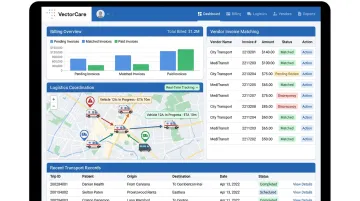
The Hub product's real-time tracking creates a verifiable, timestamped chain of events for every transport record, meaning billing data is grounded in actual service execution rather than self-reported claims.
HIPAA Requirements for Billing Dashboards
Any billing dashboard that surfaces patient-linked data — transport records tied to patient accounts, authorization histories, reimbursement details — must operate within a HIPAA-compliant environment. Under HHS guidance, billing records containing individually identifiable health information are protected health information (PHI), and any cloud platform handling that data on behalf of a covered entity qualifies as a business associate requiring a formal BAA.
Healthcare organizations should verify HIPAA compliance status before deploying any billing dashboard that touches patient-linked financial records.
Frequently Asked Questions
How do I access my billing dashboard?
Access typically requires logging into the relevant software platform and navigating to a billing or finance section in the menu. Client-facing dashboards may use a direct URL or a magic link sent to a registered email. Access is usually role-restricted, so what you see depends on your permissions.
What is a billing portal?
A billing portal is a client-facing version of a billing dashboard. It gives customers or partner organizations a dedicated online space to view invoices, update payment information, pay outstanding balances, and manage their account without contacting the vendor directly.
What is a payment summary dashboard?
A payment summary dashboard is a subset of a billing dashboard focused specifically on payment activity: collected payments, pending transactions, refunds, and current balances. Finance teams commonly use it to reconcile cash flow at the end of a billing period.
What information does a billing dashboard typically show?
Standard components include open and paid invoices, outstanding balances, payment methods on file, active subscriptions or contracts, and summary charts showing financial performance over a selected time period.
How is a billing dashboard different from a billing report?
A dashboard is a live, interactive interface for monitoring current status and taking action. A billing report is a static historical document. Most finance teams rely on both: dashboards keep daily operations on track, while reports handle compliance and period-end reconciliation.
Do billing dashboards need to be HIPAA compliant in healthcare settings?
Yes — if the dashboard surfaces or links to patient-identifiable information, such as transport records tied to patient accounts, it must operate within a HIPAA-compliant environment. Organizations should verify that any platform they use maintains appropriate safeguards and has executed a Business Associate Agreement (BAA).